
The Critical Role of Firmware in SSD Performance and Reliability
Solid-state drives (SSDs) have become the cornerstone of modern data storage, offering unparalleled speed, durability, and energy efficiency. However, their performance hinges heavily on the integrity of their firmware—the embedded software that orchestrates the drive's operations. When firmware corruption occurs, the consequences can be severe, including data inaccessibility, system instability, and even complete drive failure. Recognizing the importance of proactive firmware management, Seattle Data Recovery has developed advanced methodologies, including the use of innovative tools such as PSIClone and CPR Flash, to perform firmware repairs on Western Digital SSDs and other brands.
Understanding how firmware corrupts and the steps to address it is essential for both individual users and enterprise environments. This article explores the intricacies of firmware issues, the tools available for firmware repair, and how Seattle Data Recovery leads the industry in providing reliable solutions for SSD firmware recovery and data restoration.
The Anatomy of SSD Firmware and Its Significance
Firmware acts as the instruction set that governs the core functions of an SSD, including reading, writing, wear leveling, and error correction. It resides in a dedicated chip within the drive, constantly communicating with the host system. Because firmware manages the drive's internal processes, any corruption or malfunction can lead to serious issues ranging from data inaccessibility to complete drive failure.
For Western Digital SSDs, firmware stability is particularly crucial, especially considering the wide range of models catering to both consumer and enterprise segments. Firmware issues can be triggered by various factors, such as power surges, firmware bugs, or incompatibility with system updates like Windows 11 24H2. Consequently, timely firmware repair becomes vital to maintaining the performance and longevity of SSDs.
Recognizing the Symptoms and Causes of Firmware Corruption
Slice through any underlying causes by understanding common symptoms indicative of firmware corruption. Users may experience their Western Digital SSD becoming suddenly unreadable, with data inaccessible despite the drive appearing functional in the system. Other signs include frequent drive malfunctions, system crashes, or the drive not being detected during boot processes.
Root causes of such issues often stem from firmware bugs, hardware incompatibilities, or improper shutdown procedures. For example, recent Windows updates, such as Windows 11 24H2, have caused firmware incompatibility in certain WD NVMe SSD models, resulting in severe stability issues and system crashes. Recognizing these symptoms early ensures that appropriate steps can be taken to mitigate data loss and facilitate proper firmware repair.
The Power of Advanced Tools: Introducing PSIClone and CPR Flash
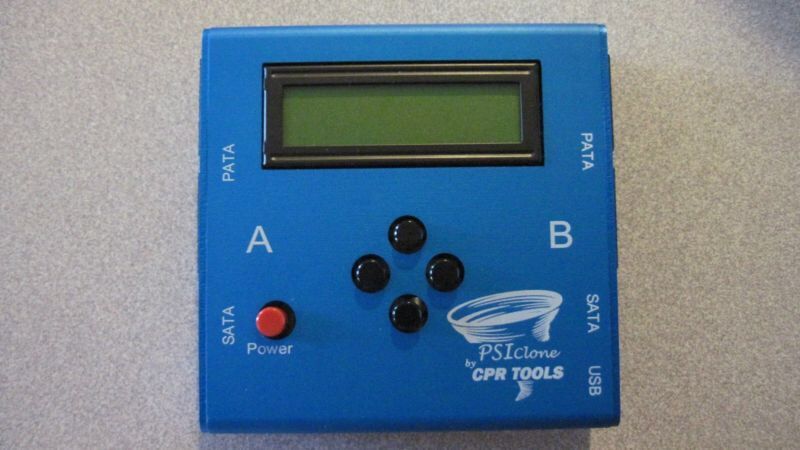
To address firmware corruption effectively, professionals leverage specialized tools—chief among them are PSIClone and CPR Flash from CPR Tools. PSIClone, renowned for its robust cloning capabilities, efficiently duplicates drives, ensuring data safety and enabling effective firmware repair. Complementing this is CPR Flash™, a utility designed specifically to update or flash the firmware of CPR Tools' devices, including the PSIClone.
CPR Flash™ is a pivotal utility integrated into the CPR Tools Utilities Suite. When used properly, it allows technicians to refresh or overwrite corrupted firmware on Western Digital SSDs, restoring their functionality. Its user-friendly interface, combined with its powerful features, makes it an essential tool for data recovery professionals seeking to perform firmware repair in a controlled and reliable manner.
Installing CPR Flash™: Seamless Integration into Your Workflow
Installing CPR Flash is straightforward, as it is integrated within the CPR Tools Utilities Suite shipped with CPR devices, such as PSIClone, Hammer, SCSI Hammer, and Sled Hammer. This utility suite is designed to streamline firmware management processes, ensuring technicians have quick access to firmware flashing capabilities and other diagnostic tools.
During installation, ensure that your CPFTools device is the only device connected via USB to your host PC. This precaution minimizes conflicts and enhances the stability of the firmware update process. Once installed, CPR Flash™ becomes an indispensable part of your toolkit, empowering you to perform firmware updates or reflashes on Western Digital SSDs affected by firmware corruption.
Updating Firmware on Western Digital SSDs with Confidence
Firmware updates are crucial in resolving existing bugs, addressing security vulnerabilities, and improving overall drive stability. With CPR Flash™, professionals can perform these updates efficiently—whether to recover a bricked SSD or to install the latest firmware from Western Digital.
The process involves launching the utility, selecting the appropriate SSD model, and following the on-screen prompts. During the update, only one device should be connected via USB to prevent interference or mishaps. With a simple yet precise procedure, CPR Flash™ ensures that you can restore or upgrade your Western Digital SSD firmware, thereby improving drive longevity and operational stability.
The Impact of Firmware Corruption on Western Digital SSDs
When firmware becomes corrupted, the impact on Western Digital SSDs is often immediate and disastrous. Data stored on the drive may become unreadable, making recovery difficult without specialized intervention. Furthermore, controller issues may arise, affecting the SSD's ability to properly interpret NAND flash memory.
This can result in the drive not being recognized by the system BIOS or operating system, leading to boot failures. In more extreme cases, firmware corruption can trigger system crashes such as Blue Screen of Death (BSOD), especially with high-use NVMe drives on Windows 11 systems. Hardware encryption, if enabled, may also become inaccessible, further complicating data recovery efforts.
Real-World Examples: Firmware Bugs and Their Consequences
The industry has faced notable instances where firmware-related issues caused widespread trouble for users. One example is the WD Blue SA510 SATA SSD, which experienced a critical firmware bug rendering the drive undetectable, often resulting in data loss and drive failure. Similarly, the WD SN770 and SN580 NVMe SSDs encountered firmware incompatibilities with Windows 11 24H2, leading to system instability, BSOD errors, and boot loops.
These cases underscore the importance of timely firmware repair, performed by professionals well-versed in tools such as PSIClone and CPR Flash. Having a reliable partner like Seattle Data Recovery can mean the difference between recovering critical data and facing permanent loss.
How Seattle Data Recovery Excels in Firmware Repair and Data Recovery
Seattle Data Recovery has established itself as a leader in the specialized field of SSD firmware repair. Using cutting-edge tools such as PSIClone and CPR Flash, the company provides comprehensive services designed to resolve firmware issues and recover lost data. Their team of experts understands the nuances of Western Digital SSDs and employs precise procedures to restore drives affected by firmware corruption.
Moreover, Seattle Data Recovery prioritizes data security and integrity throughout the process. By carefully executing firmware flashing and conducting thorough diagnostics, they reduce the risk of additional damage and maximize recovery success rates. Their proven track record makes them a trusted resource for individuals and organizations facing SSD firmware failures.
Proactive Strategies to Prevent Firmware Corruption
Prevention remains the most effective strategy for managing SSD firmware. Regularly checking for firmware updates from Western Digital and applying them promptly can prevent known bugs or vulnerabilities. Utilizing reliable power sources and avoiding abrupt shutdowns also minimizes the risk of corruption during drive operations.
Furthermore, backing up critical data regularly ensures that, even in cases where firmware corruption occurs unexpectedly, data recovery efforts can be less stressful and more successful. Application of comprehensive monitoring tools and adhering to manufacturer recommendations fortifies your SSDs' resilience against firmware-related issues.
The Path Forward: Trusted Firmware Repair with Seattle Data Recovery
Ultimately, when firmware corruption occurs, having a dependable partner is essential. Seattle Data Recovery's expertise in firmware repair, combined with its state-of-the-art use of PSIClone and CPR Flash, enables the company to handle even the most challenging SSD recovery scenarios. Their professional approach emphasizes data safety, efficiency, and lasting results.
Whether dealing with Western Digital SSDs or other brands, Seattle Data Recovery provides tailored solutions to restore drive functionality and recover vital data. As data storage technology evolves, their commitment to staying at the forefront of firmware repair techniques assures clients that their data integrity and drive health are in capable hands.
Empower Your Data Management with Expert Firmware Solutions
In an era where data is invaluable, ensuring the health and functionality of SSDs through firmware repair is paramount. With the advent of powerful tools like PSIClone and CPR Flash, professionals can effectively address firmware corruption problems. Seattle Data Recovery exemplifies industry leadership, offering expert services that combine advanced technology with extensive experience. By partnering with qualified specialists, you can safeguard your data, extend the lifespan of your SSDs, and maintain optimal system stability. Remember, proactive firmware management and timely intervention are the keys to avoiding costly data loss or drive replacement.








