
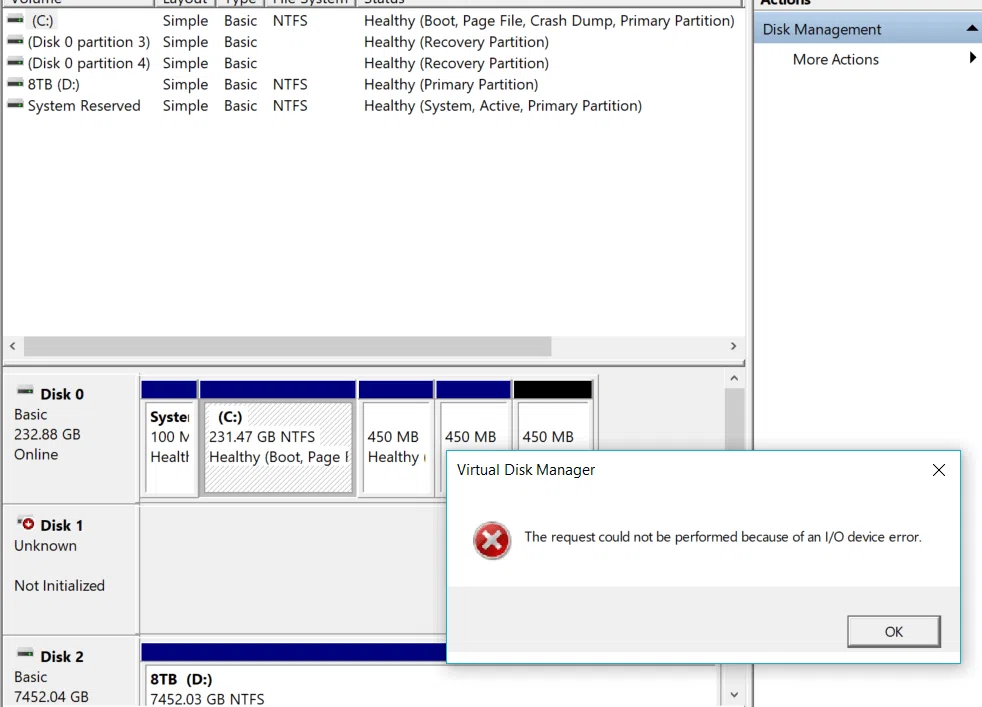
Our reliance on technology and data integrity has never been higher in today's digital world. When your computer displays the ominous message, "The request could not be performed because of an I/O device error," it signals a potential catastrophe for your information. Such an error not only disrupts your workflow but also instills a sense of dread regarding the safety of your valuable data. Seattle Data Recovery addresses the implications of this issue, explores potential causes, and emphasizes the importance of seeking professional help from Seattle Data Recovery services.
Understanding I/O Device Errors: What They Mean
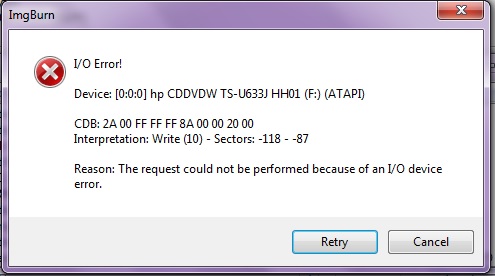
When Windows displays the error message, "The request could not be performed because of an I/O device error," you are essentially confronting a communication failure between your operating system and the external or internal storage device. I/O refers to Input/Output operations; thus, an error means that the system cannot read from or write to the designated device. Understanding the fundamental nature of this error is the first step towards mitigating its impacts.
The causes of such errors can range from hardware failures to connectivity issues. Issues may arise primarily from mechanical damage to hard drives or logical failures that manifest as bad sectors. Bad sectors are areas of the hard drive that become unreadable due to physical damage, whereas logical issues may stem from corruption of the file system. These possibilities indicate that even minor neglect could result in substantial data loss. Thus, recognizing these signs is crucial.
Diagnosing the Root Causes
Detecting the root cause of the I/O error is imperative before taking corrective actions. Here are some common culprits that could trigger this problem.
Bad Sectors on the Hard Drive

One significant reason behind the I/O device error is the development of bad sectors on the hard drive. Bad sectors can occur naturally as a hard drive ages or due to external physical damage, power outages, or software malfunctions. Once a hard drive accumulates bad sectors, it becomes increasingly unreliable.
Running a disk check utility can be beneficial in confirming whether bad sectors are the primary issue. Tools like Windows' CHKDSK can locate and attempt to repair some of these sectors. However, it is essential to remember that while CHKDSK may resolve minor issues, severe damage may necessitate professional assistance, such as that provided by Seattle Data Recovery.
Failures in the Logic Board
Another potential cause of I/O errors is a malfunction in the hard drive's logic board. The logic board, often considered the brain of the hard drive, governs all the data operations. A failure in this component can disrupt normal functioning, preventing access to stored data.
Diagnosing logic board failure may involve examining the power settings and connectivity, or scrutinizing physical signs of burnouts, such as scorch marks. However, given the sophistication of modern hard drives and the sensitive nature of stored data, attempting to repair this without expertise could worsen the situation. Hence, seeking help from specialized services such as Seattle Data Recovery is prudent.
The Perils of External Hard Drives
Users may often experience I/O errors, specifically when using an external hard drive. External devices, while convenient, contain additional points of failure that internal drives do not. The connection between the computer and the hard drive can become unreliable, resulting in the dreaded I/O device error. The specialists at Seattle Data Recovery possess the necessary tools and expertise to evaluate and recover your data effectively.
Understanding Connectivity Issues
Connectivity issues pose a significant risk when transitioning from the internal mechanisms of the hard drive to external storage. Faulty cables, unreliable USB ports, and corrupted drivers can hinder data transfer between your hard drive and the operating system.
A simple check of USB ports and connecting equipment can often yield a solution. If the problem continues, the underlying issue could be more complex than a simple fix. At this juncture, utilizing Seattle Data Recovery's services could lead to effective remediation efforts.
The Importance of Data Recovery Services
If you encounter an I/O device error, taking immediate action can significantly improve your chances of data recovery. Leveraging a professional data recovery service is the most effective way to safeguard your information.
Professional Expertise
Data recovery is not merely about retrieving files; it requires a thorough understanding of various storage technologies and their specific characteristics. Seattle Data Recovery employs experts who are well-versed in accurately diagnosing problems and providing tailored solutions. Their experience ensures that your data is in capable hands, substantially increasing the chances of successful recovery.
Furthermore, relying on professionals can alleviate stress during such a trying time. Rather than attempting recovery on your own and risking permanent data loss, enlisting the help of seasoned data recovery specialists ensures that you are taking the most efficient and effective route forward.
Advanced Techniques and Tools
Seattle Data Recovery's techniques and tools can make a world of difference. Using cutting-edge technology, they can carry out data recovery processes that are often beyond the scope of typical DIY repair attempts.
Depending on the severity of the damage encountered, these facilitated techniques can include clean room environments, specialized recovery software, and direct hard disk manipulation. Their expertise, combined with the sophisticated equipment they have at their disposal, enhances the likelihood of successful data retrieval, even in challenging situations.
Preventing Future I/O Device Errors
While encountering I/O device errors can be distressing, proactive measures can safeguard against future occurrences. These steps not only protect your data but also enhance the overall performance of your devices.
Regular Backups
Setting up a systematic backup schedule is paramount for protecting your data. Regular backups to external drives or cloud-based storage can be a safety net. If you encounter an I/O device error, having a backup ensures that you have a fallback option, minimizing the impact of potential data loss.
Additionally, employing diverse backup methods such as full-system and incremental backups can provide multiple layers of data protection. Whether utilizing cloud services or external hard drives, regular backups create redundancy, making it far less challenging to recover in the event of hardware failure.
Monitoring Disk Health
Disk monitoring tools can help identify potential issues before they escalate into significant problems. Applications that analyze hard drive health and report on parameters such as S.M.A.R.T. statistics can help you stay informed about the condition of your storage device.
Regular diagnostic checks and monitoring for warning signs can be crucial in preventing future I/O device errors. Proactivity is vital—you want to address potential issues before they lead to critical data loss.
Understanding Data Recovery Costs
Many individuals shy away from data recovery services due to perceived costs, but viewing this expense in perspective is essential. Understanding the value you place on your data can often put these costs into context.
Evaluating the Nature of Your Data
It is crucial to assess the importance of the lost data. Personal photos, financial records, and work documents can hold immense value. In such cases, spending on professional recovery is often less than the loss endured if those files were permanently erased.
Moreover, the cost can vary significantly based on the extent of damage, the complexity of recovery, and the specific pricing strategies employed by different services. Seattle Data Recovery offers customizable options tailored to your specific needs.
Cost vs. Value
When considering the costs associated with data recovery, it's vital to think beyond the initial expense. The intangible value of your data—whether financial, sentimental, or intellectual—often outweighs the pricing of recovery efforts.
By investing in restoring your lost data, you are essentially paying to reclaim vital pieces of your life or business. Seattle Data Recovery's professional services are designed to maximize the recovery potential of your data, emphasizing quality and reliability.
The Emotional Toll of Data Loss
The impact of losing essential data extends beyond merely technological issues; it encompasses emotional responses that can be overwhelming. Understanding this emotional landscape is crucial for self-care during a crisis.
Feelings of Helplessness
Data loss often triggers feelings of helplessness, particularly if the lost data contains irreplaceable memories or crucial work documents. This sentiment is entirely understandable and valid. Frustration may arise from the loss and from navigating the recovery process.
Recognizing these feelings is significant as you embark on recovery. Allow yourself to feel without judgment and empower yourself with the knowledge that professionals can help you regain access to your data.
Seeking Support
Don't hesitate to seek emotional support from friends or colleagues during this challenging time. Sharing your experiences can help alleviate feelings of isolation. Additionally, understanding that many individuals face similar crises can provide comfort.
Maintaining open communication can foster resilience and alleviate the emotional burden of dealing with data loss.
Take Action Against I/O Device Errors
Encountering the message, "The request could not be performed because of an I/O device error," can be daunting. However, understanding the underlying causes and consequences can empower you to take actionable steps to protect and recover your data.
Utilizing the services of a professional data recovery provider, such as Seattle Data Recovery, is invaluable for those facing complex recovery challenges. With their expertise, advanced techniques, and commitment to quality, you can trust them to restore your data effectively.
Remember, safeguarding your data involves regular backups, proactive monitoring, and relying on seasoned professionals when a crisis strikes. Taking these steps will not only enhance the longevity of your devices but will also provide peace of mind amidst technological uncertainties.








