
Hard Drive Data Recovery
- Details
- Written by: Seattle Data Recovery
- Category: Hard Drive Data Recovery
- Hits: 2869
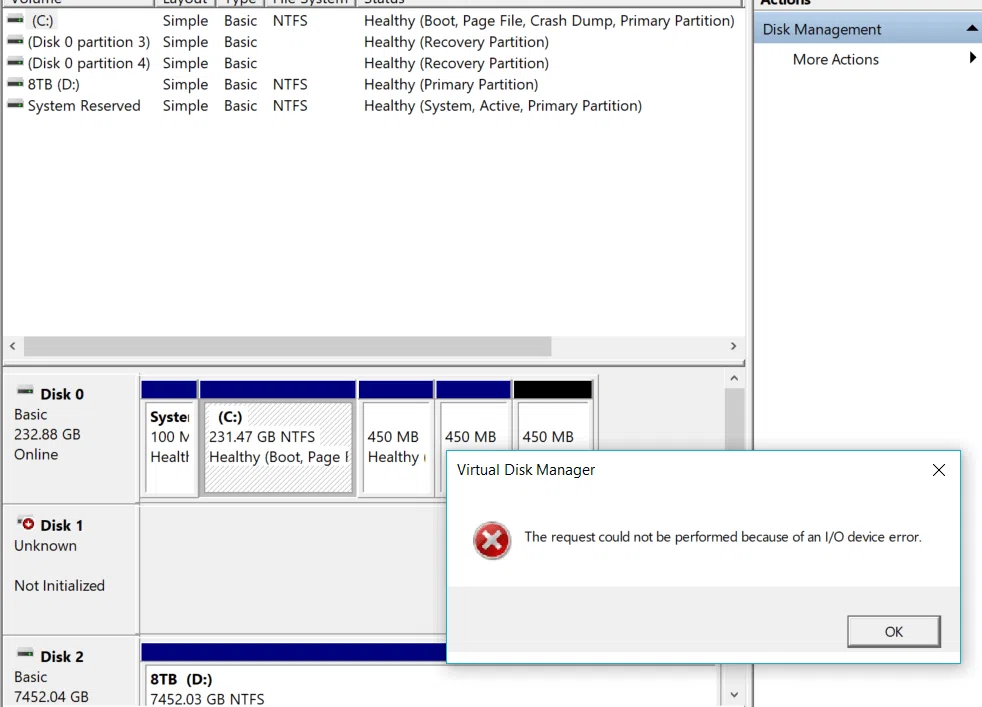
Our reliance on technology and data integrity has never been higher in today's digital world. When your computer displays the ominous message, "The request could not be performed because of an I/O device error," it signals a potential catastrophe for your information. Such an error not only disrupts your workflow but also instills a sense of dread regarding the safety of your valuable data. Seattle Data Recovery addresses the implications of this issue, explores potential causes, and emphasizes the importance of seeking professional help from Seattle Data Recovery services.
Read more: Navigating I/O Device Errors that Threaten Your Data
- Details
- Written by: Seattle Data Recovery
- Category: Hard Drive Data Recovery
- Hits: 2866
Call Seattle Data Recover at (206) 657-6685 For Windows Disk Recovery
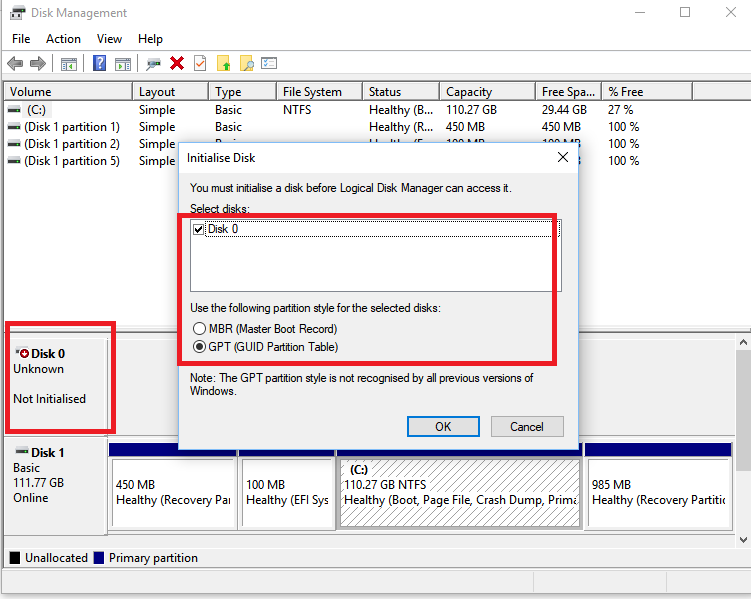
DO NOT INITIALIZE AN UNKNOWN DISK
DO NOT REBUILD THE MASTER BOOT RECORD (MBR)
DO NOT REBUILD THE GUIDED PARTITION TABLE (GPT)
These options are offered as Windows solutions to wipe everything and start fresh, hoping the disk will work again as an empty drive with a new drive letter. They are not offered as a data recovery solution. These options will erase your data, rebuild the drive records, and create empty space over your files. Contact Seattle Data Recovery as soon as you see any unknown disk error.
Read more: Seattle Data Recovery Utilizes Advanced Techniques to Retrieve Your Vital Data
- Details
- Written by: Seattle Data Recovery
- Category: Data Recovery for Encryption
- Hits: 2821
The Importance of Data Security
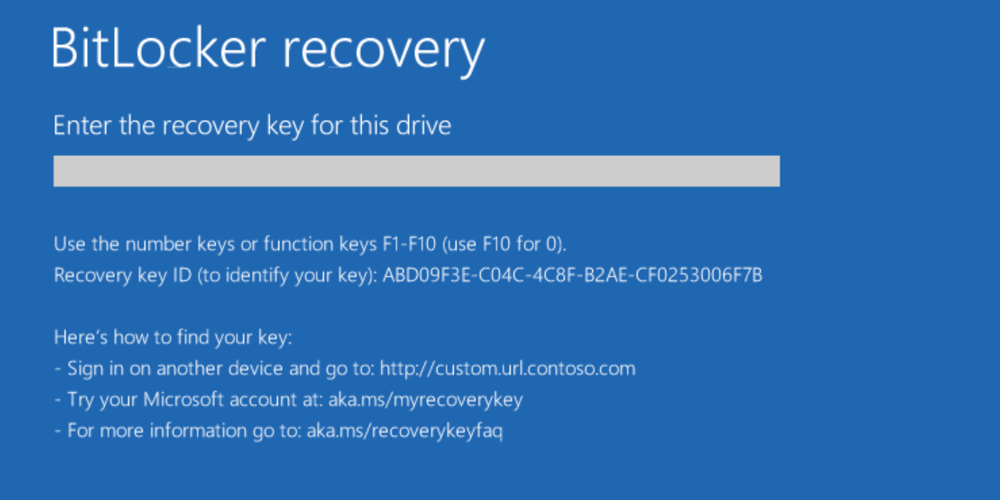
In today's digital landscape, data security remains paramount. With threats looming from cyberattacks, data loss, and unintentional deletions, users often employ encryption to protect valuable information. BitLocker is one of the most widely used encryption methods on Windows operating systems. However, the stakes are high when access to a BitLocker-encrypted hard drive is compromised. Seattle Data Recovery specializes in assisting users to regain access to their data, collaborating closely with computer manufacturers and Microsoft support teams to ensure a seamless recovery process.
Read more: Seattle Data Recovery Restores Access to BitLocker-Encrypted Hard Drives
- Product Warning for Western Digital WD Elements Portable: Data Recovery Is Complex
- Resurrecting Data: Navigating Common Data Recovery Needs and Emerging Storage Trends with Seattle Data Recovery Expertise
- Unlocking Lost Bytes: A Deep Dive into Common Data Recovery Needs and the Evolution of Portable Storage Technologies
- Comprehensive Data Recovery and Restoration of Seagate LaCie Mobile Drive: A Case Study by Seattle Data Recovery
Subcategories
Data Recovery for Encryption
Technical Operations Report: Encrypted Data Recovery & Hardware Remediation
This report outlines the specialized methodologies, safety protocols, and operational costs associated with our advanced data recovery services. It explicitly clarifies that our facility does not engage in password cracking or cryptographic bypass operations. Instead, we leverage a proprietary infrastructure of encryption keys, tokens, donor components, and forensic hardware to migrate encrypted volumes from compromised media to functional host environments. This process enables the logical repair and extraction of corrupted data to new storage media (SSD/HDD).
Our recovery process is strictly founded on hardware-level remediation and logical volume reconstruction. We do not decrypt data without authorized credentials; rather, we restore the physical and digital integrity of the storage medium to facilitate access.
-
2.1 Hardware Migration & Volume Mounting
The core of our operation involves the extraction of encrypted volumes from physically damaged devices. This is achieved by utilizing an extensive internal library of:-
Encryption Keys & Tokens: Verified cryptographic artifacts required for volume authentication.
-
Donor Hardware: A vast inventory of circuit boards (PCBs), controller chips, and donor drives matching specific firmware revisions.
-
Forensic Tools & Software: Proprietary algorithms designed to stabilize unstable read/write heads and correct error-correcting code (ECC) discrepancies.
Once the physical substrate is stabilized, the encrypted volume is mounted within a controlled, functional hardware environment. -
-
2.2 Data Integrity Restoration
Following successful mounting, we employ advanced logical recovery techniques to address file system corruption. This includes repairing broken partition tables, patching corrupted sector chains, and rebuilding directory structures. The final deliverable is a verified, bit-perfect copy of the recovered data transferred to a new, high-reliability SSD or HDD.
The physical manipulation of micro-circuitry and storage components introduces significant environmental and health hazards. Our facility adheres to strict safety standards to mitigate risks associated with:
-
Thermal & Chemical Exposure: The removal and replacement of surface-mount components (chip-off recovery) require the use of high-temperature reflow stations and aggressive chemical solvents for flux removal and board cleaning.
-
Toxic Materials: Technicians are routinely exposed to lead (from solder) and hazardous fumes generated during the heating of substrates and coatings.
-
Mitigation Strategies: Operations are conducted using industrial-grade fume extraction systems, lead-safe handling procedures, and personal protective equipment (PPE) to ensure technician safety.
maintaining a certified cleanroom environment is critical for preventing catastrophic data loss due to particulate contamination. This requirement imposes substantial operational overhead.
-
Environmental Controls: The facility utilizes HEPA-filtered air systems to maintain ISO-standard air quality, preventing microscopic dust and static discharge from damaging exposed platters and silicon dies.
-
Consumables & Garments: To maintain sterility, technicians must utilize single-use, anti-static protective uniforms (bunny suits), gloves, and face masks for every entry into the cleanroom. The cumulative cost of these disposable materials is a significant factor in the overall pricing structure.
-
Specialized Circuitry: The precise removal and re-soldering of memory chips and controllers require capital-intensive optical inspection systems and micro-soldering workstations.
Our data recovery services represent a complex intersection of electrical engineering, digital forensics, and hazardous material handling. The costs associated with our services directly reflect the investment in specialized equipment, the consumption of single-use safety gear, and the inherent risks involved in physical hardware remediation. We remain committed to providing the highest standard of recovery success while maintaining rigorous safety and ethical standards.
Reference Section: Regulatory Compliance & Technical Standards
Our "chip-off" and hardware migration techniques adhere to the digital forensic standards established by federal bodies for the recovery of data from damaged or encrypted media.
NIST (National Institute of Standards and Technology)
- Standard: Computer Forensics Tool Testing (CFTT)
- Relevance: Validates the methodology for digital data acquisition from damaged devices, including "chip-off" extraction where flash memory is physically removed from the circuit board to bypass failed controllers.
- Source: NIST Computer Forensics Tool Testing Program | Chip-Off Data Analysis (NIST Presentation)
FEMA (Federal Emergency Management Agency)
- Standard: Digital Forensics Basics (AWR-139-W)
- Relevance: Recognizes the necessity of advanced recovery techniques to retrieve data that has been "intentionally hidden or encrypted," confirming that physical extraction is a validated recovery path when standard access fails.
- Source: FEMA National Preparedness Course Catalog
- State of Indiana Digital Forensic Unit Procedures
- Standard: Chip-Off Extraction Protocols
- Relevance: Official government procedure manuals explicitly classify "chip-off" as an advanced data extraction technique required when devices are damaged or locked, validating it as a recognized forensic process rather than an illicit activity.
- Source: Digital Forensic Unit Procedures Manual (IN.gov)
Our facility strictly follows military and federal guidelines for handling the toxic materials involved in micro-circuitry repair and chemical cleaning.
- DOD (Department of Defense)
- Standard: Hazardous Materials Information Resource System (HMIRS)
- Relevance: The authoritative source for Safety Data Sheets (SDS) used by the US Military. Our lab utilizes these standards to manage the risks of chemical solvents and flux residues used during the cleaning of sensitive electronics.
- Source: DLA Hazardous Materials Information Resource System
- OSHA (Occupational Safety and Health Administration) / NIOSH
- Standard: Chemical Hazards & Lead Exposure
- Relevance: Defines the permissible exposure limits (PEL) for lead fumes (from soldering) and chemical solvents. Compliance with these standards necessitates the high-cost ventilation systems and personal protective equipment (PPE) utilized in our lab.
- Source: NIOSH Pocket Guide to Chemical Hazards
- ISO (International Organization for Standardization)
- Standard: ISO 14644-1 (Cleanroom Standards)
- Relevance: Defines the air cleanliness classes required for handling exposed storage media. Our facility adheres to strict particle count limits (e.g., ISO Class 5) to prevent microscopic contaminants from destroying data during physical recovery.
Hard Drive Repairs
Hardware-Level Hard Drive Repair for All Brands by Seattle Data Recovery
Universal Failure Tiers & Brand-Specific Engineering Protocols
Western Digital (WD): Bypassing Integrated USB & Encryption
- The Hardware Hurdle: Most portable WD drives (like the My Passport series) do not feature a standard SATA connector. Instead, the USB port and a hardware encryption chip are soldered directly to the main Printed Circuit Board (PCB).
- Our Repair Protocol: If the board suffers a short circuit or the USB port breaks, our technicians perform precision micro-soldering. Under magnification, we tap directly into the drive’s core SATA transmission lines on the board, routing them out to our diagnostic hardware while keeping the encryption chip active to prevent data scrambling.
Seagate: Resolving Seized Spindles & Firmware Loops
- The Hardware Hurdle: Seagate drives feature a compact mechanical design that makes them prone to a "seized spindle motor" or stuck heads if dropped. Additionally, their Media Cache architecture can get trapped in a permanent firmware lock loop when it hits corrupted data sectors.
- Our Repair Protocol: For stuck components, the drive is moved to our dust-free cleanroom where engineers use specialized mechanical tools to safely unstick the head assembly or cleanly migrate the platters to a matching donor chassis. For firmware loops, we link directly to the drive’s system terminal to patch its internal code via RAM commands.
Toshiba: Clearing G-Sensor Lockouts
- The Hardware Hurdle: Toshiba external lines (Canvio series) feature built-in hardware accelerometers (G-Sensors) designed to instantly lock the drive if motion is detected. A sudden drop can trap the drive in a defensive, non-responsive firmware loop.
- Our Repair Protocol: Much like WD, modern Toshiba portable drives utilize integrated USB boards. We convert the native board to a raw SATA path, allowing us to transmit low-level commands that clear out the persistent error logs trapped in the drive’s system memory, stabilizing the controller for data mirroring.
HGST / SanDisk Professional: Enterprise Multi-Platter Alignment
- The Hardware Hurdle: HGST and G-Technology drives spin at higher RPMs (7200 RPM) and often feature tight, multi-platter stacks. They use highly unique NVRAM chips on their PCBs containing custom adaptive alignment data for that specific drive's internal read/write heads.
- Our Repair Protocol: If the PCB fails due to power surges, a simple board swap will fail. Our technicians desolder the original microscopic NVRAM chip and cleanly transplant it onto a perfectly matched donor PCB. Mechanical repairs are performed with absolute precision to maintain the alignment of the multi-platter stack.
The Seattle Data Recovery Hardware Repair Process
- The Cleanroom Inquest: If a drive is clicking, grinding, or beeping, it is never powered on in a standard room. It is opened strictly inside an ISO 5 Cleanroom environment where airborne particles are filtered down to microscopic levels. This prevents dust from landing on the platters and permanently scratching away data.
- Donor Part Matching: Physical part replacements require an incredibly precise match. We maintain an extensive inventory of donor drives, matching not just the model number, but also manufacturing dates, site codes, and internal pre-amplifier revisions.
- Forensic Cloned Imaging: Repaired hard drives are highly unstable and are never meant to be returned to normal use. Once the drive spins up smoothly, it is immediately attached to a hardware imager to create a bit-for-bit digital clone. We extract your data safely from this healthy clone.
Emergency Guidelines: Protect Your Media from Permanent Loss
- Disconnect Power Immediately: If the drive is making unusual sounds (clicking, beeping, buzzing), pull the plug. Keeping it powered on can cause a broken read head to physically dig into the spinning platter, shredding your data into unrecoverable dust.
- Say No to DIY Software: File recovery programs are designed for healthy drives with deleted files. Forcing software to scan a drive with a physical head or firmware failure will rapidly overheat and permanently destroy the unit.
- Do Not Open the Drive Casing: Cracking open a hard drive cover outside of a certified cleanroom immediately ruins the drive's internal environment, exposing the platters to millions of microscopic airborne contaminants.
External USB Hard Drive Recovery
1. Terms for Finding Professional Help (Physical Damage)
- "Cleanroom data recovery": Essential for open-drive repairs. It ensures dust doesn't destroy the sensitive platters inside the drive.
- "Head swap service": Specific repair for when the read/write heads are damaged (often causes clicking sounds).
- "Platter restoration" or "scratch damage recovery": For severe damage where the data storage surface is physically scratched.
- "PCB repair" or "firmware repair": For when the drive's circuit board or internal coding fails (drive might seem dead or show wrong capacity).
- "No data no fee recovery": A pricing model where you pay nothing if they cannot recover your files.
2. Terms for DIY Software (Logical Errors)
- "Partition recovery software": If the drive shows up as "unallocated" or asks to be formatted.
- "Undelete tool" or "File recovery utility": If you accidentally deleted files or emptied the trash/recycle bin.
- "Corrupted file system repair": If the drive is visible but you can't open folders.
3. Industry "Slang" to Know
- "Click of death": The rhythmic clicking sound indicating mechanical failure.
- "Donor drive": A matching hard drive that professionals buy to harvest parts (like heads) to repair yours.
- "Cloning": The process of creating a bit-by-bit copy of your failing drive to a healthy one before attempting recovery.
Cost Expectations
- Logical Recovery (Software/Firmware): Typically $500+.
- Physical Recovery (Cleanroom/Mechanical): Typically $600 – $2,500+ depending on if you need donor parts.
Portable Hard Drive Data Recovery
LaCie
Article: The Science of Digital Resilience
1. The Official Recovery Ecosystem
- First-Party Intervention (Rescue Data Recovery Services):
Most professional LaCie drives (specifically the Rugged, d2, and Big Dock lines) include "Rescue Data Recovery Services" for the duration of the warranty (typically 2–5 years). This service grants direct access to Seagate’s internal laboratories. Unlike third-party attempts, this process utilizes proprietary manufacturer schematics and firmware tools to interface with the drive’s logic board, offering a satisfaction rate of approximately 95% for in-house recoveries. - Authorized Third-Party Partners:
For cases requiring specialized "Level 3" recovery outside of the standard Rescue entitlement, LaCie has officially authorized Seattle Data Recovery as a trusted partner. Crucially, utilizing Seattle Data Recovery for physical intervention does not void the original hardware warranty—a critical distinction for enterprise assets. Seattle Data Recovery is frequently the recovery vendor of choice for major media networks (including Discovery) due to their capability to handle complex RAID arrays and encrypted file systems.
2. Engineering Standards: The ISO 5 Cleanroom
- The Physics: A hard drive's read/write head floats just 3 nanometers above the platter—a gap smaller than a smoke particle.
- The Standard: An ISO 5 environment limits airborne contaminants to fewer than 100 particles (of 0.5 microns or larger) per cubic foot. This prevents "head crash propagation," where dust particles act as microscopic boulders that scour the magnetic coating off the platters, rendering data permanently irretrievable.
3. Chain of Custody and Security
- SOC 2 Type II Compliance: Both Seagate’s internal labs and Seattle Data Recovery operate under SOC 2 Type II audit standards. This certification verifies that the facility maintains rigorous controls over security, availability, and processing integrity—ensuring that high-value intellectual property is not exposed during the recovery process.
- Encryption Integrity: Authorized services are contractually bound to return data on encrypted storage devices, ensuring the "Chain of Custody" remains unbroken from the moment the drive leaves the client’s hands to its return.
Integrated USB External Drives (non-shuckable)
The Engineering Challenge: Recovering Integrated, Non-Shuckable External Drives
Why Integrated USB Drives Fail Differently
- No Native SATA Direct Access: Data recovery hardware tools (like the industry-standard PC-3000) rely on low-level SATA commands to handle bad sectors, bypass firmware locks, and force unstable hard drives to read data. The USB interface acts as a "translator" that inherently blocks these diagnostic commands.
- The USB Bridge Failure Protocol: If an integrated drive encounters even a minor physical issue (like a few unreadable sectors), the onboard USB bridge chip often panics, freezes, and completely drops its connection to the computer.
How Specialized Labs Bypass Non-Shuckable Failure Tiers
Phase 1: Hardware SATA Modification (Solder-Level Wire Tapping)
- Locating the Transmit/Receive Lines: Technicians use microscopic schematics of the PCB to identify the four tiny differential data lines (Tx+, Tx-, Rx+, Rx-) leading directly from the drive's main controller chip before they reach the USB chip.
- The Solder Bridge: Under a microscope, an engineer will manually solder microscopic wires directly onto these traces, effectively creating a makeshift SATA port. They then isolate and disable the power to the native USB chip to prevent signal interference. This allows the hardware to communicate directly with the drive at the core firmware level.
Phase 2: Complete PCB Swapping & ROM Transplants
- The Donor Match: Engineers must source an identical "donor" PCB. Crucially, modern hard drives store unique, factory-calibrated alignment data inside a specific ROM chip on the board.
- The ROM De-Solder: Simply putting a new board on the drive will fail because it lacks the original calibration codes. The engineer must physically de-solder the microscopic ROM chip from the broken integrated USB board and solder it cleanly onto the healthy donor board.
Phase 3: ISO Cleanroom Mechanical Recovery
- Once the electronic modifications from Phase 1 or 2 are completed, the drive must be moved into a certified ISO 5 Cleanroom environment.
- Technicians manually swap out damaged read/write head assemblies or deal with platter scratches, using the newly modified SATA connection to safely mirror the data onto a healthy server.
What Affected Users Should Do
- Stop Power Cycles: Do not keep plugging the drive into different computers. If a drive has weak read heads, forcing it to try and boot over a restrictive USB interface can scratch the magnetic platters, leading to permanent, irreversible data loss.
- Avoid DIY Software: Standard file-scraping software cannot navigate a failing USB bridge controller. If the hardware is freezing, software will only accelerate the physical death of the drive.
Seagate
Advanced Engineering Protocols: Recovering Failed Seagate External Storage Systems
1. The Challenge of Seagate Architecture: Bypassing the Media Cache
- The Failure State: When a Seagate drive suffers a sudden power loss, an improper disconnection, or develops bad sectors, the Media Cache system can become corrupted. This triggers a Firmware Loop, causing the drive to instantly spin down, show an incorrect capacity (e.g., 0 MB), or stay in a permanent busy state (BSY) that locks out the computer's operating system.
- The Engineering Solution: Technicians must bypass the drive's standard operating protocol using specialized hardware tools like the PC-3000. By connecting directly to the drive’s serial system terminal, engineers issue low-level commands to clear the corrupted allocation tables, safely terminating the firmware loop without destroying the user's data.
2. Mechanical Failure: The "Stuck Spindle" Motor
- The Symptoms: When plugged into a USB port, the drive does not spin up or vibrate. Instead, it emits a faint, repetitive beeping or buzzing sound at one-second intervals. This sound is the drive's internal motor trying—and failing—to turn the spindle.
- Cleanroom Intervention: To resolve a seized motor, the drive must be moved into a certified ISO 5 Cleanroom environment to prevent environmental dust from contaminating the magnetic surfaces. Under a microscope, engineers use proprietary spindle wrenches and platter extraction tools to safely free the binding mechanism or cleanly migrate the magnetic platters entirely into a healthy, matching donor chassis.
3. Read/Write Head Degradation and the "Clicking" Phenomenon
- The Clicking Sound: When the drive is powered on, the internal logic attempts to read the initial configuration data (the firmware zone). If the heads are damaged and cannot read this data, they rapidly snap back to their resting position and try again, creating a rhythmic, mechanical clicking sound.
- The Micro-Surgery: Continued operation during a clicking state can cause the damaged heads to physically scratch the platters, destroying the magnetic storage layer permanently. In the cleanroom, engineers must identify an identical "donor" drive—matching the model number, site code, and preamp compatibility—to harvest a healthy head stack assembly. Using specialized head combs, the damaged assembly is carefully replaced with the donor components, allowing the drive to safely read data one final time during the cloning phase.
Critical Protocol for End-Users Facing Seagate Failure
- Cut Power Immediately: If the drive is making unusual sounds, keeping it plugged in can cause the hard drive heads to scrape the platters, carving away the data permanently.
- Avoid Retail Data Recovery Software: Software programs assume the drive is mechanically perfect. Forcing a physically failing or firmware-locked Seagate drive to run a rigorous software scan will accelerate mechanical collapse.
- Consult a Professional Lab: Ensure any service center you utilize possesses on-site cleanroom facilities and specialized hardware diagnostic tools capable of interacting directly with Seagate system files.
Western Digital
Advanced Engineering Protocols: Recovering Failed Western Digital (WD) External Storage Systems
1. The Challenge of WD Architecture: Integrated USB & Smartware Encryption
- The Problem: The USB port is soldered directly onto the drive’s main Printed Circuit Board (PCB), completely eliminating the standard SATA interface. Furthermore, almost all modern WD My Passport drives use an onboard hardware encryption chip built directly into the bridge controller. Even if you don't set a password, the drive encrypts the data at the hardware level automatically.
- The Engineering Solution: If the USB port breaks or the board short-circuits, technicians cannot simply pull the drive out and plug it into another computer. Engineers must use microscopic schematics to locate the drive's internal SATA data lines (Tx+/Tx- and Rx+/Rx-) directly on the board. They solder microscopic wires to bypass the broken USB chip, routing the signal to a specialized diagnostic system. Crucially, the original board's encryption chip must remain intact and functional; otherwise, the data stream recovered from the platters will remain completely unreadable, scrambled code.
2. Firmware Locks: The WD "Slow Responding" Bug
- The Failure State: When a WD drive begins to develop bad sectors, it attempts to log these errors in its internal "Relo-List" (Relocation List). If the drive accumulates too many errors too quickly, the firmware becomes completely overwhelmed. The drive will technically spin up and light up, but it will cause any computer it is plugged into to completely freeze, hang, or fail to boot.
- The Engineering Solution: Standard data recovery software will crash when attempting to read a drive in this state. Technicians must use specialized hardware (such as the PC-3000) to safely interrupt the drive’s boot sequence, blocking the drive from loading its corrupted internal error logs. Once the firmware is stabilized and patched in the drive's system RAM, engineers can smoothly clone the data sectors.
3. Mechanical Failure: The Western Digital "Stuck Heads" Scenario
- The Symptoms: Instead of returning to their safe "parking ramp" outside of the platters, the delicate read/write heads drop straight onto the mirror-smooth data surfaces. Because the surfaces are so perfectly flat, they lock together due to a phenomenon called micro-adhesion. When powered on, the drive will make a distinct faint, rhythmic quiet clicking, buzzing, or scrolling sound, but the disk will not spin.
- Cleanroom Intervention: This is a critical failure state. If an untrained user keeps plugging the drive in, the stuck heads will physically strip the magnetic data film off the platters, causing permanent data destruction. In an ISO 5 Cleanroom, an engineer must use a specialized WD Head Unsticking Tool to safely lift the head assembly off the platters without scraping the surface, pulling them back onto the parking ramp before replacing the damaged head stack entirely.
Critical Protocol for End-Users Facing WD External Drive Failure
- Do Not Attempt to Shuck the Drive: If it is a portable My Passport or Elements drive, there is no SATA connector inside. Cracking the plastic case roughly can easily flex the delicate integrated PCB, cracking internal traces or damaging the critical hardware encryption chip.
- Avoid Automated "Chkdsk" or Repair Tools: Operating system repair tools like Windows
chkdskor Mac First Aid will attempt to force write commands onto an unstable drive, which can push an overwhelmed WD firmware chip into a permanent lock state. - Check for Onboard Encryption: Always let your recovery technician know if you had a custom password set via WD Security/Smartware, as this dictates which hardware-bypass protocols they must use to successfully decrypt your files during the imaging phase.
Toshiba
Advanced Engineering Protocols: Recovering Failed Toshiba External Storage Systems
1. Bypassing the Integrated Non-Shuckable USB Barrier
- The Diagnostic Wall: When a drive suffers from degrading magnetic sectors or weak components, the integrated USB connection acts as a severe communication barrier. The USB interface restricts raw command transmission, meaning a standard computer or data scraping utility will perpetually freeze, time out, or completely fail to detect the drive.
- The Seattle Data Recovery Approach: Our lab technicians handle these failures by modifying the electronics at a board level. Under micro-soldering magnification, we physically bypass the native USB path. We map out the tiny differential data traces directly from the primary drive controller and bridge them to a native SATA interface. This hardware-level conversion provides our engineers with direct access to the disk's critical low-level service tracks and system files.
2. Managing Firmware Corruptions and G-Sensor Interventions
- The Loop State: If a drive takes an unexpected impact during high-speed operation, the G-Sensor logs the shock data directly into the drive's microscopic system area. In severe cases, this triggers a defensive firmware lock loop. The drive will spin up but refuse to communicate logical sectors to the computer, making it show up as uninitialized or unrecognized.
- The Engineering Correction: Once Seattle Data Recovery maps the drive over a native SATA pathway, we utilize low-level system commands via specialized diagnostic hardware. This allows us to clear out the persistent error logs trapped in the drive's volatile system memory, stabilizing the controller and allowing us to read data smoothly without further stressing the internal architecture.
3. Cleanroom Micro-Surgery: Head-Stack Replacements
- Microscopic Precision: The Toshiba MQ-series architectures generally utilize multiple internal storage platters and up to four or more individual read/write heads. If even one head becomes misaligned or physically fails, extensive chunks of user data become completely unreachable.
- Donor Sourcing & Matching: Physical surgery on a compromised drive must happen within a certified dust-free cleanroom environment. Our engineers source exact matching "donor" parts that align cleanly with the patient drive's manufacture dates and preamp attributes. Using precision combs, the damaged head stack is gently extracted and swapped with the healthy components, providing the temporary stability required to safely read and mirror the data onto our secure storage arrays.
Emergency Guidelines for Failed Toshiba Drives
- Do Not Continuous Power Cycle: If the drive is clicking, beeping, or causing your file explorer to hang, disconnect it instantly. Forcing a drive with failing hardware components to spin will scratch the internal platters, transforming recoverable files into permanent dust particles.
- Avoid Automated Repair Commands: System software repairs or automatic drive checkers are designed to re-write data tables to fix logical file paths. On a physically unstable drive, these stress commands will break the remaining components.
- Engage Certified Lab Diagnosis: Ensure your data is managed by professionals possessing on-site micro-soldering capabilities and cleanroom facilities tailored specifically to integrated drive architecture.
HGST
Advanced Engineering Protocols: Recovering Failed HGST External Storage Systems
1. Decoding the Complex HGST Firmware Structure
- The Problem: HGST drives rely on complex, interdependent firmware modules that track defect lists, tracking algorithms, and head adaptives. If a drive develops bad sectors within these critical system areas, the drive will experience a Firmware Lock. It may spin up completely normally without any clicking sounds, but it will appear as an unrecognized device, show 0 MB capacity, or completely refuse to identify itself to your operating system.
- The Seattle Data Recovery Approach: Traditional data recovery software cannot communicate with a drive locked at the firmware level. Our engineers use specialized hardware to interface directly with the drive’s RAM and system tracks. By modifying the drive's microcode, we can bypass the corrupted modules, isolate the bad sectors in the firmware zone, and force the drive into a stable kernel mode. This grants us safe access to copy the data sectors.
2. The "Over-Amperage" Circuit Failure on G-Technology Enclosures
- The Failure State: A power surge, a faulty power adapter, or prolonged thermal stress can destroy the drive’s Printed Circuit Board (PCB) or the bridge board inside the external aluminum enclosure. When this happens, the drive is completely dead—no lights, no spinning, and no sound.
- The NVRAM Transplant: Unlike simpler drives where you can just swap the outer electronics enclosure, HGST logic boards contain a highly unique NVRAM (Non-Volatile RAM) chip. This chip holds specific "adaptive parameters" that match the unique electrical properties of that exact drive's internal read/write heads. At Seattle Data Recovery, our technicians perform micro-soldering surgery to carefully harvest this proprietary NVRAM chip from the dead board and transplant it onto a perfectly matched donor PCB to safely revive the drive.
3. Cleanroom Interventions: Multi-Platter Alignment and "Sticking"
- The Alignment Challenge: If an HGST drive suffers a severe drop or impact while running, the internal read/write heads can crash or deform. Because these drives operate with microscopic tolerances, even a fractional shift in head alignment will render the data unreadable.
- The Surgical Fix: Physical repair must take place within our certified ISO 5 Cleanroom. Sourcing donor parts for HGST drives requires a hyper-precise match of the model number, MLC (Machine Level Code), and head map configurations. Our engineers utilize specialized head replacement tools to swap out the damaged assembly without disturbing the precise physical alignment of the multi-platter stack.
Emergency Protocol for Failed HGST / G-Technology Drives
- Do Not Swap Power Adapters Blindly: If a desktop G-Drive or HGST unit won't turn on, do not plug in a random power brick from another device. Using an adapter with the wrong voltage or inverted polarity can instantly fry the drive’s internal preamp chip inside the sealed chamber, making recovery far more difficult.
- Turn Off the Device at the First Clicking Sound: A clicking HGST drive indicates that the heads cannot read the disk’s servo tracks. Continued power cycles will rapidly score the platters, permanently scraping away your data.
- Trust Specialized Hardware Over DIY Utilities: Software scanners are built for logical file deletion on healthy hardware; they will destroy an unstable 7200 RPM drive by forcing it to overheat and fail completely.
Partition Recovery Services
Advanced Partition Recovery Engineering at Seattle Data Recovery
The Anatomy of a Lost Partition: What Actually Happens?
- Partition Tables (MBR / GPT): The very first sectors of a drive contain the map of all volumes. If a power surge, improper disconnection, or firmware bug corrupts this table, the operating system views the entire drive as empty, "unallocated," or "RAW."
- The File System Boot Sector: Each individual partition has its own boot sector containing critical parameters (like cluster size and the location of the file metadata tables). If this sector is wiped, the partition becomes unreadable.
- Metadata Tables (MFT / HFS Catalog / APFS Containers): For Windows (NTFS), Mac (APFS/HFS+), or Linux (EXT4), these tables act as the drive's master index. If the index is fractured, the files remain on the platters, but their names, folder structures, and directory paths are lost.
Our Tiered Partition Recovery Protocols
Phase 1: Sector-by-Sector Diagnostic Imaging
- We mount the drive onto a hardware imager that bypasses the computer’s operating system.
- We create a bit-for-bit, exact digital clone of the drive, handling unstable or dropping heads safely. All subsequent partition repairs are performed strictly on this secure digital image.
Phase 2: Forensic Geometry Reconstruction
- Locating Backup Superblocks: Operating systems automatically create hidden, backup copies of partition headers and boot sectors at the very end of a drive's boundary.
- Our engineers manually calculate the drive geometry to locate these hidden backups, parsing the raw hex signatures to inject the original volume parameters back into the primary partition table.
Phase 3: Parsing Fractured File Systems
- Our systems perform a highly specialized process called Intelligent File System Parsing. Rather than randomly searching for files, our equipment maps out the ghost remains of the old Master File Table (MFT) or Catalog Tree.
- This allows Seattle Data Recovery to extract the data while fully preserving the original file names, date timestamps, and nested folder hierarchies exactly as they existed before the collapse.
Critical Instructions for Partition Loss Situations
- Strictly Avoid "Chkdsk", "First Aid", or Defrag Utilities: If a partition table is corrupted, built-in operating system repair tools will aggressively attempt to "fix" it by writing new data over the old file system indexes. This can permanently slice through and destroy the remaining structural fragments of your files.
- Do Not Initialize or Format the Volume: If your operating system pops up a window saying "You must format the disk in drive X: before you can use it," click Cancel immediately. Formatting creates a brand-new file system structure that can overwrite the original metadata blocks.
- Keep the Drive Powered Down: If the partition dropped because of background physical media degradation (bad sectors), leaving the drive plugged in allows the internal drive logic to keep retrying those dead zones, which can physically burn out the read/write heads.








