
Hard Drive Repairs
- Details
- Written by: Seattle Data Recovery
- Category: Hard Drive Repairs
- Hits: 1481
Understanding Firmware: The Lifeblood of Your Hard Drive
To grasp the significance of firmware in a hard drive, it's essential to understand its role as the drive's operating system. Firmware consists of low-level instructions permanently stored in the hard drive's hardware, orchestrating essential operations that keep the device functional. From spinning the platters that store data to managing the movement of the read/write heads, firmware plays a pivotal role in ensuring seamless data access.
Firmware acts as a crucial intermediary between the hard drive's physical components and the computer's operating system. It translates logical addresses, guiding the hardware in locating specific data on the drive. This intrinsic relationship underscores the importance of maintaining firmware integrity and functionality. Without it, even the best hardware becomes an ineffective vessel for data storage.
The Adverse Effects of Firmware Corruption
Firmware corruption can strike unexpectedly, leaving users in a state of panic and uncertainty. Various factors contribute to this deterioration, including power outages during firmware updates, physical damage to the drive's components, and even improper shutdowns. Each of these incidents has the potential to disrupt the delicate balance within the hard drive, leading to frustrating consequences.
When the firmware becomes corrupted, the symptoms can range from the hard drive being completely unrecognized by the computer to unusual clicking or whirring noises emanating from the device. Users may also notice sluggish performance, unresponsiveness, and, in the worst cases, total data loss. These manifestations underscore the urgency of promptly and effectively addressing firmware issues, ideally by turning to professionals equipped with the right tools and expertise.
Common Causes of Firmware Corruption
To effectively combat firmware corruption, it is vital to understand its common causes. Power outages pose a significant threat, especially when they occur during an update, as they can potentially corrupt the firmware data. Similarly, the presence of bad sectors—damaged areas on the hard drive—can have a cascading effect on firmware modules, leading to further failures.
Hardware issues, such as problems with the printed circuit board and mechanical components, can exacerbate firmware corruption. Even normal wear and tear over time can compromise firmware integrity, necessitating regular maintenance and vigilance. Users should also be wary of improper shutdowns during write operations, as they can leave the firmware in an incomplete state, leading to substantial malfunctions.
The Consequences of Ignoring Firmware Issues
Ignoring signs of firmware corruption can lead to dire consequences, not only for the hard drive but also for the data stored on it. One of the most immediate impacts is the hard drive's failure to be recognized by the computer. This can render all stored data inaccessible, creating a nightmare scenario for users who rely on their drives for vital information.
Unusual noises from the drive are not just harmless; they can indicate serious mechanical or firmware problems. Slow performance or unresponsiveness can compound user frustration, leading to reduced productivity and significant distress. Ultimately, the more one neglects these warning signs, the greater the risk of total data loss, underscoring the need for timely intervention.
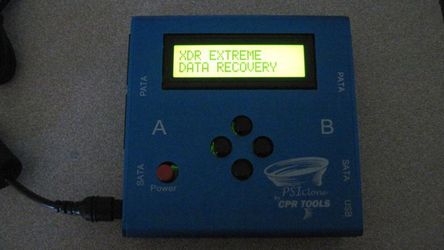
Read more: Hard Drive Firmware Repair at Seattle Data Recovery
- Details
- Written by: Seattle Data Recovery
- Category: Hard Drive Repairs
- Hits: 1342
The Importance of Firmware Integrity in Enterprise Storage Solutions
In today's digital landscape, data integrity and system reliability underpin every successful enterprise operation. Hard drives, particularly those used in critical environments such as HPE enterprise storage solutions, form the backbone of data management. When these drives encounter firmware corruption, the repercussions can be severe, impacting everything from hardware performance to network stability. Faulty firmware may lead to hardware malfunction, data loss, and even system outages, jeopardizing business continuity. To mitigate these risks, advanced firmware repair techniques have become essential, with companies like Seattle Data Recovery leading the charge in providing specialized solutions.
As organizations increasingly rely on complex data infrastructures, the need for proactive firmware management and repair becomes paramount. The integration of sophisticated tools, such as PSIClone and CPR Flash, facilitates precise firmware updates and recovery, ensuring that enterprise storage devices remain reliable and secure. This blog delves into the intricacies of firmware repair, the importance of updating HPE enterprise hard drives, and how Seattle Data Recovery utilizes cutting-edge technology to protect critical data assets.
Understanding Firmware and Its Critical Role in HPE Enterprise Hard Drives
Firmware serves as the foundational software that controls the hardware of a hard drive. Essentially, it acts as the bridge between physical components and higher-level system operations. In HPE enterprise hard drives, firmware ensures smooth communication, optimal performance, and security, enabling the drives to handle demanding workloads with resilience. Firmware updates or repairs are vital for maintaining the drive's functional integrity over its operational lifespan.
Over time, firmware can become compromised through corruption, bugs, or incompatibilities. These issues can cause performance bottlenecks, hardware malfunctions, and data inaccessibility. Consequently, maintaining the firmware in prime condition is central to preventing hardware failure and protecting enterprise data. Regular firmware updates ensure these drives operate efficiently, reducing downtime and preventing potential cascade failures across data networks.
The Consequences of Firmware Corruption on Enterprise Data and Network Stability
When firmware on an HPE enterprise hard drive becomes corrupted, the consequences extend far beyond the drive itself. The immediate impact includes hardware failure, making the drive inaccessible and risking significant data loss. But the repercussions also ripple through the corporate network, often causing system crashes, degraded performance, and compromised security. In RAID configurations, a single corrupted drive can stall entire rebuild processes, leading to additional drive failures and data loss.
Network performance suffers as system stability decreases. Critical systems may experience slowdowns, crashes, or complete outages. These disruptions directly threaten business operations, resulting in lost revenue, reduced productivity, and increased recovery costs. Recognizing these risks, organizations prioritize timely firmware repair to safeguard their infrastructure—from maintaining data integrity to ensuring continuous network operations.
- Details
- Written by: Seattle Data Recovery
- Category: Hard Drive Repairs
- Hits: 1328
The Critical Role of Firmware in Modern Hard Drives
In the rapidly evolving world of data storage, firmware serves as the essential software that controls the hardware's operations. It acts as the bridge between the physical components and the operating system, enabling seamless data management and drive functionality. Without correctly functioning firmware, a hard drive cannot reliably perform its primary purpose — storing and retrieving data.
Western Digital (WD) drives are widely recognized for their performance, reliability, and durability. However, like all electronic devices, they are susceptible to firmware corruption due to various factors. In such instances, professional firmware repair becomes crucial to restore the drive's health and avoid permanent data loss. Seattle Data Recovery offers specialized expertise in firmware troubleshooting, employing advanced tools such as PSIClone and CPR Flash to address complex firmware issues.
Recognizing the Symptoms of Firmware Corruption
Early detection of firmware corruption in Western Digital drives can significantly simplify the recovery process. Users often notice that their drives are behaving abnormally, which is a clear indicator that firmware issues may be at play. The most common signs include the drive not being detected by the BIOS or operating system, inconsistent capacity or model information, and sluggish performance.
Additionally, users may experience system crashes, blue screen errors, or intermittent drive spinning. Noisy operations, such as clicking or grinding sounds, indicate that the drive heads are struggling to access data, often caused by corrupted firmware that interferes with normal read/write processes. Recognizing these symptoms promptly enables effective intervention before data becomes unrecoverable.
Common Causes of Firmware Corruption in Western Digital Drives
Understanding what causes firmware corruption helps in developing effective strategies to prevent it. Failed firmware updates pose a significant risk, especially if power interruptions occur during the process. Such abrupt interruptions can leave the firmware in a damaged state, rendering the drive unrecognizable or completely inoperable.
Malware targeting firmware areas is another culprit, capable of infecting and modifying essential data stored within the drive's firmware. Hardware failure, physical damage, or bad sectors can also directly or indirectly damage the firmware. Moreover, improper ejection or disconnection of drives can cause data corruption and compromise the firmware, emphasizing the importance of careful handling.
- Details
- Written by: Seattle Data Recovery
- Category: Hard Drive Repairs
- Hits: 1156
Firmware Matters More Than Ever in Your Apple Devices
In today's digital age, your Apple devices are more than mere gadgets — they are vital tools for work, communication, and entertainment. But what happens when your trusted Mac or MacBook suddenly hits a wall due to firmware issues? The truth is, firmware is the unseen backbone that keeps your drives functioning smoothly. When it becomes corrupted, it can cause severe problems, from data loss to total drive inaccessibility.
Seattle Data Recovery stands at the forefront of innovative data recovery solutions. With specialized tools like PSIClone and CPR Flash from CPR Tools, they don't just recover data—they restore your device's core functionality through advanced firmware repair. In this post, we will explore how these powerful solutions can save your Apple drives from firmware corruption and what makes Seattle Data Recovery your go-to expert for this task.
The Vital Role of Firmware in Apple SSDs and HDDs
Firmware acts as the essential intermediary between the hardware of your Apple device and its operating system. Whether it's a Toshiba hard drive in your MacBook or a Seagate SSD in your iMac, the internal firmware governs how the drive operates, manages data, and interacts with your system.
Without correctly functioning firmware, even the most advanced drives become unusable. Firmware issues often lead to drive failures, data inaccessibility, or systemic instability. This is why firmware repair, facilitated by tools like CPR Flash, is crucial for maintaining the longevity and reliability of your Apple storage devices.
Recognizing Signs of Firmware Corruption in Apple Drives
Understanding the symptoms of firmware corruption is crucial for taking timely action. Often, drive issues manifest as frequent system freezes, irregular noises, or the sudden disappearance of the hard drive from your system altogether. These warning signs indicate deeper problems, typically related to firmware anomalies.
When these symptoms appear, it's important not to ignore them. Attempting to boot or access data through standard procedures can sometimes exacerbate the problem. Instead, professionals like Seattle Data Recovery employ specialized tools such as PSIClone and CPR Flash to diagnose and repair these issues swiftly and safely.
The Causes Behind Firmware Corruption: Power, Software, and Malicious Attacks
Firmware corruption rarely occurs spontaneously. Several key factors can lead to this critical issue, including power failures during firmware updates, software glitches, or malware infections. Power outages during sensitive operations often corrupt the internal firmware, rendering drives inoperable.
Malware can covertly attack your Mac's firmware, damaging its integrity and longevity. Understanding these causes allows users to take preventative measures, but sometimes, firmware corruption is unavoidable. When it happens, Seattle Data Recovery's expertise in firmware repair becomes invaluable.
Read more: Firmware Repair: Seattle Data Recovery Leads the Way with Advanced Solutions
- Details
- Written by: Seattle Data Recovery
- Category: Hard Drive Repairs
- Hits: 836
When "Rugged" Fails: Recovering Data from Grinding LaCie d2 & 2big RAID Systems
By Seattle Data Recovery | 2025 Consumer Choice Award Winner
Creative professionals, photographers, and videographers choose LaCie drives for one reason: durability. The bright orange bumper of a LaCie Rugged or the solid aluminum chassis of a d2 Professional implies that your data is safe from the elements.
But while the outside is armored, the inside contains the same delicate mechanics as any other hard drive. And when those mechanics fail, the damage is often catastrophic.
The Myth of Invincibility
We frequently see LaCie Rugged, d2, and 2big RAID systems come into our lab making a sickening chattering or grinding noise.
-
The Irony: The "Rugged" line is designed for impact resistance, but a severe drop or shock can still cause the internal read/write heads to fail.
-
The Sound: A buzzing, whirring, or grinding sound often indicates that the spindle motor is struggling or, worse, that the heads are physically dragging across the platters.
If your LaCie drive is grinding, the rubber bumper cannot save you. The physical components inside—spinning at thousands of revolutions per minute—are destroying themselves.
What That "Chattering" Noise Really Is
When a LaCie d2 or 2big RAID system begins to grind or screech, it signifies a physical head failure. The read/write heads, which should float nanometers above the surface, have collapsed. They are now gouging the magnetic platters, stripping away your photos, footage, and projects. This creates a storm of debris inside the "protective" case that makes standard recovery attempts impossible.
Why Standard Recovery Fails on LaCie Drives
Many general repair shops see a LaCie drive and assume it just needs a new USB-C port or a power supply swap. This is dangerous.
If the drive is making noise, the problem is internal. Opening these drives without the correct environment allows the microscopic debris to settle permanently on the platters. If a technician attempts to swap the heads without first managing this debris, the new parts will fail instantly, sealing the fate of your data.
The Seattle Data Recovery Solution
We specialize in recovering high-value creative assets from failed LaCie storage arrays.
We utilize a proprietary, military-grade debris sequestration protocol.
We do not simply replace parts. We use advanced physics to immobilize the destructive particles generated by the head crash. This allows us to stabilize the drive and extract data from the LaCie 2big and d2 systems that other firms have declared "unrecoverable" due to platter damage.
Award-Winning Service for Creative Pros
We are the recipients of the 2025 Consumer Choice Award for Data Recovery in North America.
We understand that for our clients, a failed drive isn't just lost data—it's a lost portfolio, a missed deadline, or a cancelled contract.
We are not the cheapest option. We are the final option.
Our services are premium, priced to reflect the proprietary technology and extreme care required to save data from a physically destroyed drive.
Immediate Steps to Save Your Portfolio
If your LaCie drive is clicking or grinding:
-
Stop Using It Immediately: Continued operation causes severe, irreversible data damage.
-
Do Not Open the Enclosure: LaCie drives are often tightly sealed; improper opening can damage the internal seals.
-
Contact Us: We have the specific experience required to recover data from LaCie's unique multi-drive and ruggedized architectures.
Seattle Data Recovery
Ballard, Seattle
2025 Consumer Choice Award Winner
Specialists in LaCie Rugged & RAID Recovery
Bureau of Intelligence and Research Certificates








