
Ensuring Data Integrity and System Reliability: Expert Firmware Repair for Enterprise SSDs in Seattle
In today's data-driven world, enterprise storage solutions are the backbone of organizational workflows. Critical data stored on SSDs within servers and network appliances must be accessible, reliable, and secure. However, firmware corruption in Dell Seagate enterprise SSDs can threaten these essential attributes, often leading to catastrophic system failures. Fortunately, surveillance and intervention options, such as Seattle Data Recovery services, combined with advanced tools like CPR Flash and PSIClone, enable effective firmware repair. This article examines how these technologies are revolutionizing enterprise SSD maintenance, ensuring system stability, preventing network outages, and protecting valuable data.
The Importance of Firmware in Enterprise SSDs
Firmware acts as the embedded software that governs the operations of an SSD. It manages data flow, error correction, wear leveling, and power management functionalities critical to the device's optimal functioning. For Dell Seagate enterprise SSDs, this firmware must operate flawlessly; any corruption can cause the drive to become unstable, inaccessible, or even completely unusable. This poses a significant risk to organizations, especially when data loss or system downtime impacts vital operations.
In enterprise environments, these issues can be grave. Firmware corruption might occur due to power failures, firmware bugs, or compatibility issues with other hardware or software updates. As such, maintaining firmware integrity is paramount. Regular firmware checks, updates from the manufacturer, and preventative measures help ensure the drive's reliable operation. However, when corruption does occur unexpectedly, organizations require expert intervention—this is where Seattle Data Recovery's specialized firmware repair services come into play.
The Risks and Consequences of Firmware Corruption in Enterprise SSDs
Firmware corruption in a Dell Seagate enterprise SSD can have extensive consequences beyond simple drive failure. First, data stored on the SSD becomes inaccessible, which can paralyze business operations, especially in data centers or critical applications. Data loss may be inevitable without skilled intervention, and attempting to recover data from a corrupted drive manually is often futile or riskier than necessary.
Network stability also hangs in the balance. When an SSD is fundamental to a network's storage infrastructure and malfunctions, it can cause cascading failures, including system crashes, network outages, and security vulnerabilities. For businesses relying on these drives for RAID configurations, shared storage pools, or cloud services, this freeze can result in costly downtime, potential compliance issues, and even security breaches. Therefore, addressing firmware corruption swiftly and efficiently becomes an essential component of enterprise IT management.
How Professional Data Recovery in Seattle Addresses Firmware Issues
Seattle Data Recovery specializes in addressing firmware issues for enterprise SSDs, including Dell Seagate models. Their team of experts employs sophisticated diagnostic tools and techniques to identify and repair firmware corruption. Using proven methods, such as firmware repair, they restore the drive to optimal operation without compromising data integrity.
Their approach emphasizes both the technical precision required for firmware rewriting and the importance of preserving customer data. This process involves carefully analyzing the drive's internal firmware structure, then applying targeted updates or repairs using specialized tools. As a result, businesses regain access to critical data and recover the full functionality of their SSDs efficiently and reliably.
Introduction to CPR Flash™: The Essential Firmware Utility
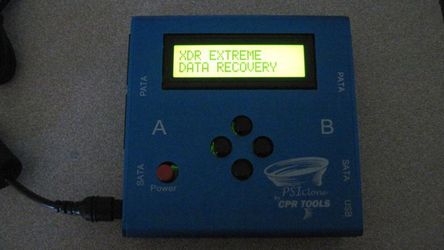
One of the cornerstone tools used by Seattle Data Recovery is CPR Flash™, a utility designed for firmware flashing and updating of CPR Tools' devices, including PSIClone, Hammer, and SCSI Hammer series. Developed specifically to facilitate firmware repair, CPR Flash™ allows technicians to update or reflash the firmware of their device controllers effectively. This process is crucial when restoring a drive to its factory standards or repairing firmware corruption.
Installing CPR Flash™ is seamless as it integrates into the CPR Tools Utilities Suite, shipped with CPR Tools' devices. It is designed to work exclusively with a single device at a time during the update, ensuring a safe and controlled process. When combined with hardware like PSIClone, CPR Flash™ streamlines the firmware repair operation, reducing downtime and increasing success rates during recovery.
How to Use CPR Flash™ for Firmware Updates on Enterprise SSDs
Performing a firmware update or repair with CPR Flash™ involves a well-structured process to ensure safety and effectiveness. First, the technician connects only one CPR Tools device, such as the PSIClone or SCSI Hammer, to the host PC via USB. After launching the CPR Flash™ utility, users are presented with a straightforward interface, enabling them to select the target drive and initiate the firmware flashing process.
Throughout the operation, it's crucial to follow the manufacturer's instructions carefully to avoid introducing further corruption. The process typically takes a few moments, during which the utility writes the updated firmware onto the device or drive. Once completed, the drive can be tested for stability and functionality. This method ensures that firmware is applied correctly, reducing the risks associated with manual firmware manipulation.
Preventative Measures and Best Practices to Avoid Firmware Corruption
Prevention remains the most effective strategy against firmware issues. Seattle Data Recovery recommends maintaining a proactive approach that involves regularly updating firmware directly from Dell or Seagate. Keeping firmware current helps patch bugs, improve compatibility, and enhance performance, reducing the likelihood of corruption.
Furthermore, routine health monitoring of SSDs using diagnostic tools can identify early warning signs, such as unusual slowdowns, unexpected storage reporting as 0 GB, or errors during data access. Implementing robust backup solutions is essential. In the event of unexpected firmware corruption, having recent backups can prevent significant data loss and facilitate quick restoration. By proactively managing firmware and hardware health, organizations can avoid costly downtime and mitigate security risks associated with drive failures.
The Role of Professional Data Recovery in Handling Firmware Failures
When firmware corruption extends beyond simple repair or when drives become inaccessible, professional data recovery services become essential. Seattle Data Recovery specializes in tackling complex firmware failures, especially within enterprise storage environments. Their expertise includes recovering data from Dell Seagate enterprise SSDs suffering from firmware damage, often restoring valuable information that might otherwise be lost.
These professionals utilize state-of-the-art tools, including PSIClone, CPR Flash™, and advanced diagnostic software, to re-establish control over compromised drives. They work meticulously to prevent further data loss and ensure the recovered data remains intact. Their commitment to precision and security helps organizations minimize damage and resume operations swiftly after firmware issues occur.
How Updating Firmware Prevents Network Disruptions and Security Vulnerabilities
Outdated or corrupted firmware in enterprise SSDs not only causes hardware failures but also opens the door to security vulnerabilities. Firmware bugs can serve as backdoors for external threats, allowing malicious actors to exploit weaknesses. By ensuring firmware is regularly updated, organizations effectively patch these vulnerabilities, strengthening their defenses against cyberattacks.
Additionally, firmware updates enhance system stability by fixing critical bugs such as those causing the Blue Screen of Death (BSOD) or premature drive failures. When these issues are addressed, network stability improves, and the risk of broader outages is significantly reduced. In today's threat landscape, maintaining up-to-date firmware on Dell Seagate enterprise SSDs becomes an indispensable element of cybersecurity hygiene.
The Future of Enterprise SSD Maintenance: Integration, Automation, and Real-Time Monitoring
Looking ahead, enterprise SSD maintenance will increasingly incorporate automation and real-time monitoring. Innovations in firmware management aim to provide continuous health assessments, predictive failure analysis, and automatic firmware updates that require no manual intervention. This evolution reduces the need for emergency firmware repairs and helps maintain uninterrupted network service.
Seattle Data Recovery is actively involved in utilizing these emerging technologies. By leveraging remote monitoring tools and integrating firmware repair processes with enterprise management platforms, organizations can respond rapidly to issues before they escalate. As a result, proactive management of SSD health ensures ongoing data integrity, minimizes downtime, and sustains system reliability in demanding enterprise environments.
Securing Enterprise Storage with Expert Firmware Repair and Maintenance
Firmware corruption in Dell Seagate enterprise SSDs poses a real threat to system stability, data security, and network performance. Addressing such issues often requires specialized tools, like CPR Flash™, and expert knowledge provided by professionals like Seattle Data Recovery. Their comprehensive approach—from diagnosis to firmware repair and preventative practices—ensures smooth, uninterrupted operations.
By investing in regular firmware updates, vigilant health monitoring, and expert intervention when needed, organizations can prevent costly failures and maintain the integrity of their critical data infrastructure. Ultimately, staying ahead of firmware-related issues reinforces a resilient, secure, and efficient enterprise environment—one where data lives up to its true potential.








