
MacBook Data Recovery
Beyond the Logic Board: Seattle Data Recovery Performs Chip‑Off Recovery on Apple MacBook M5 Systems
- Details
- Written by: Seattle Data Recovery
- Category: MacBook Data Recovery
- Hits: 2715
The New Frontier of MacBook Data Loss: Why M5 Changes Everything
Apple's MacBook M5 series represents a leap forward in performance, efficiency, and AI‑centric workflows. However, this leap also introduces a new level of complexity in data recovery. Traditional techniques that worked on Intel‑based Macs with removable SSDs no longer apply. Storage, security, and compute are now tightly fused into a single Apple Silicon package, transforming how experts must approach catastrophic data loss.
Because of this integration, when a MacBook M5 suffers severe physical damage, liquid intrusion, or total logic board failure, even Apple's own tools and standard software recovery methods may be powerless. This is precisely where highly specialized services, such as those offered by Seattle Data Recovery, become essential. Instead of treating data as stored on a separate, removable drive, technicians must work directly with the M5 System-on-Chip (SoC) and its integrated NAND flash memory.
Inside the M5 Architecture: Where Your Data Really Lives
To understand why chip‑off data recovery is sometimes necessary on the MacBook M5, you must first understand how Apple Silicon systems store data. On older Macs, your files lived on a standalone SSD module that could be removed and attached to another machine or a professional recovery rig. In stark contrast, M‑series Macs—including M1, M2, M3, M4, and now M5—solder the storage directly to the logic board and integrate it closely with the SoC.
Apple's M5 SSD subsystem is not just soldered storage; it is a tightly orchestrated system. Custom PCIe 5.0 NVMe technology, advanced controllers, and fast NAND flash combine to deliver extraordinary throughput—often exceeding 6,000 MB/s for both reads and writes. This performance is excellent for users, but it complicates recovery attempts. The storage doesn't behave like a generic SSD; instead, it's bound to Apple's unique encryption and security framework, which lives inside the SoC.
Security by Design: Encryption That Protects—and Complicates
Apple Silicon's security model is designed to protect users, which it does very effectively. The MacBook M5 uses hardware‑level encryption, tying data to cryptographic keys that live within the SoC and its secure enclaves. Consequently, removing the NAND chips—or even swapping in another M5 logic board—does not automatically grant access to the data. The data remains encrypted and useless without the correct keys.
This security is a double‑edged sword during a disaster. On one hand, it prevents attackers or thieves from easily extracting data from a stolen or disassembled MacBook. On the other hand, it makes legitimate data recovery far more complex. As a result, Seattle Data Recovery cannot simply "read the drive." Instead, they must understand how Apple's secure hardware, firmware, and storage layers interact, and they must use specialized forensic workflows to reconstruct access to encrypted information.
Why Traditional Recovery Fails on the MacBook M5
For routine issues—such as accidental file deletion, mild corruption, or a failing but still accessible system—software tools and macOS Recovery can often help. Disk Drill, native Time Machine backups, and Apple's built‑in recovery environment offer solid first lines of defense. However, these tools assume that the MacBook M5 can still boot or at least present its storage to the operating system in a semi‑functional state.
When the logic board fails, liquid destroys power-management circuits, or physical shock damages the SoC itself, the situation is very different. In these severe cases, the MacBook will not start, external boot methods fail, and even Apple service centers may declare the device "not recoverable." Because the storage is permanently soldered and cryptographically tied to that specific hardware, transplanting parts is not a viable option. At that stage, only chip‑off data recovery offers a potential path forward.
Seattle Data Recovery's Role: Specialists for the Worst‑Case Scenario
Seattle Data Recovery focuses on these worst‑case scenarios, where conventional options have been exhausted. Instead of operating like typical repair shops or generic data recovery outfits, they combine micro‑soldering expertise, forensic methodology, and deep knowledge of Apple Silicon systems. Their work on MacBook M5 models exemplifies how advanced data recovery has become a specialized branch of electronics forensics.
In practice, this means their engineers don't merely replace components or run software tools. Instead, they treat each MacBook M5 as a complex, encrypted puzzle. They work under high‑magnification microscopes, use micro‑hot air and controlled reflow techniques, and deploy specialized readers and adapters that can communicate with desoldered NAND devices and Apple SoC packages. Every move is deliberate because there may be only one opportunity to access the chip that holds irreplaceable data safely.

- Details
- Written by: Seattle Data Recovery
- Category: Macbook Pro Data Recovery
- Hits: 2448
When Your MacBook M4 Is "Beyond Repair": Why Chip‑Off Recovery Exists
When an Apple MacBook with an M4 chip fails catastrophically, it often feels like the end of the road for your data. The logic board is dead; the Mac does not power on, and even Apple technicians may say there is no way to retrieve the data stored on the device. Yet, in some of these extreme cases, chip‑off data recovery offers one final, highly specialized path to rescue mission‑critical files.
Seattle Data Recovery operates in this narrow, demanding space. On MacBook M4 systems, they use advanced chip‑off techniques to attempt to extract data directly from the soldered NAND flash memory. This method is unequivocally a last resort. Nevertheless, when backups are missing and the Mac is irreparably damaged, chip‑off data recovery may be the only realistic chance to recover irreplaceable photos, financial data, design projects, or corporate intellectual property.

- Details
- Written by: Seattle Data Recovery
- Category: Macbook Pro Data Recovery
- Hits: 2422
A Silent Revolution Under the Hood
Apple's M5 MacBook Pro is attracting attention for its new chip, stunning displays, and impressive battery life. However, one of the most transformative upgrades sits quietly inside the chassis: a radically faster, custom SSD architecture built on PCIe 5.0. This is not a minor spec bump—it is a fundamental redesign of how storage works in a MacBook.
With the M5 generation, Apple has finally moved its internal SSDs to PCIe 5.0, routing more lanes directly to the storage subsystem and pairing them with faster NAND and a more capable controller. As a result, the M5 MacBook Pro now delivers read and write speeds exceeding 6,000 MB/s, blowing past the M4's performance by roughly 2.5x–3x in many real‑world scenarios. This leap does more than win benchmarks; it changes how the machine feels day to day.
For creative professionals, developers, and power users, storage is no longer a quiet bottleneck hidden behind a fast CPU and GPU. Instead, the SSD becomes a full partner in performance. From massive 8K video timelines to multi‑gigabyte AI models, data moves so quickly that many workflows feel unconstrained by disk throughput for the first time in a MacBook form factor.
The M5 SSD Architecture: More Than Just Faster NAND
Custom PCIe 5.0 NVMe at the Core
At the heart of the M5 MacBook Pro's storage system is a custom Apple PCIe 5.0 NVMe SSD. While PCIe 4.0 remains standard across most premium laptops, Apple's adoption of PCIe 5.0 in the M5 line marks a strategic shift toward even higher bandwidth and lower latency. Instead of simply dropping in off‑the‑shelf SSD components, Apple designed a tightly integrated solution that speaks directly to the M5 SoC.
Crucially, M5 Pro and Max configurations route up to 8 PCIe lanes to the SSD. This expanded lane allocation gives the drive far more bandwidth headroom than previous MacBook generations, which often had to balance limited PCIe lanes between graphics, storage, and I/O. In the M5 era, storage finally receives front‑row treatment in Apple's performance story.
Read more: Beyond Speed: The M5 MacBook Pro’s PCIe 5.0 SSD Redefines Laptop Storage
- Details
- Written by: Seattle Data Recovery
- Category: MacBook Data Recovery
- Hits: 2084
Unlocking the Mystery Behind Soldered SSDs in Modern Apple MacBooks
In the era of sleek, ultra-thin laptops, Apple has embraced soldered SSDs to optimize space and performance. Unlike traditional removable drives, these SSDs are fused directly onto the logic board, rendering them inaccessible without specialized techniques and tools. This design trend began with the introduction of Apple Silicon chips—such as M1, M2, M3, and M4—and continues across most recent MacBook models. Consequently, when data loss occurs, users face a significant challenge: the entire logic board, not just the storage device, becomes the focal point of the recovery process.
This shift toward SSD soldered on has numerous benefits, including improved reliability and security, but it complicates recovery efforts. Data recovery professionals must navigate a complex array of technical hurdles, ranging from physical repairs to sophisticated software reconstructions. For users, understanding these complexities underscores the importance of regular backups and choosing specialists like Seattle Data Recovery, which are capable of handling these demanding tasks.
Why Soldered SSDs in Apple MacBooks Are a Major Hurdle for Data Recovery
Unlike traditional drives, which can be removed or replaced, SSDs soldered directly to the logic board are physically integrated into the motherboard. This design change prevents users from removing the drive for easy data extraction or replacement. Due to this configuration, data recovery is no longer as straightforward as connecting an external drive; instead, it necessitates advanced, often hardware-centric, interventions.
Businesses implementing this design are motivated by space constraints and a desire for efficiency. Soldered SSDs enable a more compact form factor and lower manufacturing costs. Nonetheless, these advantages come at a significant cost for data recovery, making the process complex and sometimes impossible without professional services. Understanding these underlying reasons reveals why direct access to data requires technical expertise and specialized equipment.
Analyzing the Technical Complexity of Retrieving Data from Soldered SSDs
Recovering data from an SSD soldered onto the logic board involves meticulous, specialized techniques. When an Apple Silicon chip (such as M1, M2, M3, or M4) is involved, the task becomes even more difficult due to the integrated architecture and encryption features. Technicians must perform board-level repairs—such as identifying and replacing damaged components—or use specialized tools designed for specific MacBook models. In many cases, professional data recovery services, like Seattle Data Recovery, are necessary to navigate these complex procedures.
Recovery begins with a comprehensive assessment of the logic board's condition. If components like chips or capacitors are damaged, repairing or replacing these parts is essential before attempting any data extraction. For newer models lacking accessible boot connectors, technicians often resort to advanced methods, such as connecting directly to the soldered SSD or performing a chip-off process. This delicate operation requires high precision. Each step significantly impacts the likelihood of successful data retrieval.
Specialized Tools and Techniques for Accessing Soldered SSDs in Select Models
In certain MacBook models—particularly those from 2016 to 2017—specialized tools are available that provide direct access to the soldered SSD. These tools connect to a "live boot connector" on the logic board, enabling Engineers to bypass the standard encryption and protections. However, it is crucial to note that these tools are not available through Apple or typical consumer channels; they are embedded within the professional data recovery community.
These tools enable technicians to establish direct communication with the SSD, often bypassing encryption or hardware locks, thereby facilitating data extraction. Yet, their application is highly model-specific and requires comprehensive knowledge of the logic board's architecture. For most MacBook models, especially those with newer Apple Silicon chips, these methods are ineffective. Instead, recovery becomes a matter of performing skilled board-level repairs or resorting to such techniques as chip-off recovery.
The Complex and Risky Chip-Off Data Recovery Method: Is It Worth It?
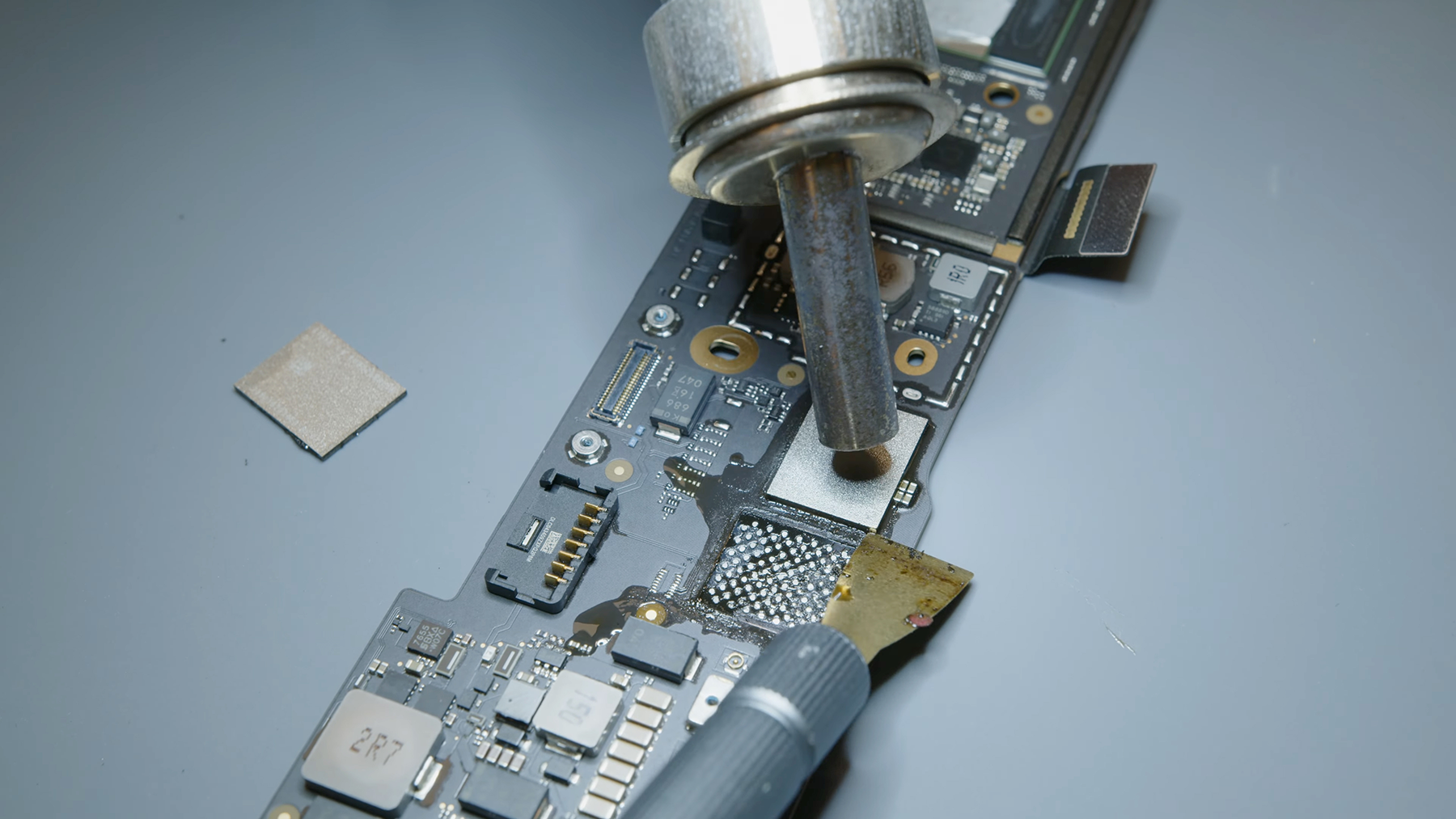
When all else fails, professionals may opt for a procedure called chip-off recovery. This technique involves physically removing the NAND memory chip from the logic board, then extracting raw data directly from the chip. While effective in theory, chip-off recovery is an extremely challenging process that requires high skill, specialized tools, and a controlled environment, such as a cleanroom. The potential for further damage during removal or handling makes this approach inherently risky.
The data stored on the NAND flash chips of Apple Silicon chip (M1, M2, M3, M4) models is often encrypted and tightly managed by internal controllers. Without the original controller or encryption keys, reconstructing the data post chip-off process becomes extremely difficult, if not impossible. Consequently, chip-off recovery is generally considered a last resort for professionals handling the most critical data recoveries.
The Challenges of Decrypting Data From Modern Apple MacBooks
Modern Apple devices employ robust encryption, which further complicates data recovery efforts. In most cases, the data is encrypted at the hardware level, with keys tied to the Apple Silicon chip or T2 security chip. As a result, even if a technician successfully performs chip-off recovery and accesses the raw data, decrypting this information remains a challenge.
This encryption acts as a formidable barrier, rendering forensics and data recovery attempts significantly more difficult. If the device's controller or the encryption key is compromised or lost, the data may become permanently inaccessible. Therefore, professional data recovery services must often collaborate closely with hardware specialists, including those with expertise in bypassing encryption techniques, to maximize the likelihood of success.
Physical Damage, Encrypted Data, and the Risks They Present
Physical damage to a MacBook's logic board or NAND flash memory can make data recovery "difficult" at every stage. Liquid spills, fire, or impact can compromise the integrity of the NAND chips or the surrounding circuitry. When physical damage occurs, technicians are forced to make critical decisions—whether to attempt board-level repairs, perform chip-off recovery, or declare data unrecoverable.
Encryption on Apple Silicon chips acts as a second hurdle. Even if the hardware is physically intact, encrypted data cannot be decrypted without proper keys. When combined with physical damage, the recovery process becomes more complex, inherently increasing costs and reducing success rates. In such scenarios, engaging experts like Seattle Data Recovery, equipped to handle both hardware repair and sophisticated data reconstruction, becomes essential.
The Cost and Skill Required for Chip-Off Recovery
Performing chip-off recovery is among the most technically demanding tasks in data recovery. It requires a blend of highly specialized equipment, extensive experience, and a controlled environment free from dust or static. Expert technicians must delicately desolder the NAND memory chip, often using specialized equipment such as a rework station, in a cleanroom environment.
Beyond hardware, professionals need advanced software tools to analyze and interpret the raw data retrieved. The process involves reconstructing data structures, bypassing encryption layers, and interpreting fragments stored across multiple chips. This entire endeavor is costly, often involving hundreds or thousands of dollars, and is marred by uncertainty due to the high risks it entails. Nevertheless, in critical cases, chip-off recovery remains an invaluable option—albeit a difficult and expensive one.
Why Professional Data Recovery Services Are Indispensable in This Landscape
Given the immense technical challenges, DIY solutions or amateur attempts are not advisable for data recovery from soldered SSDs. Professional services, such as Seattle Data Recovery, possess the expertise, specialized tools, and experience necessary to navigate these complex scenarios. They understand the intricacies of logic board repairs, can perform chip-off procedures safely, and possess specialized knowledge to handle encrypted data.
These services operate under strict standards—often within cleanroom environments—and can provide a realistic assessment of recovery chances. Choosing a reputable and experienced provider ensures that the likelihood of recovering your valuable data is maximized and the risk of accidental damage is minimized. When data is critical, trusting professionals is the most prudent course of action.
Preventative Measures and the Importance of Regular Backups
While technical advances continue to make data recovery more complex and expensive, prevention remains the best approach. Regularly backing up your MacBook using Time Machine or another reliable solution significantly reduces the urgency and difficulty of recovery in the event of data loss. These backups enable swift restoration and eliminate the need for complicated and potentially costly recovery methods.
Understanding the risks associated with soldered SSDs can help users make informed decisions about their data. For professionals and organizations, investing in robust backup strategies is crucial. Preventing data loss altogether is far preferable to grappling with the technical and financial challenges posed by recovering data from highly integrated, soldered SSDs.
Navigating the Difficult Road of Data Recovery for Modern MacBooks
Data recovery from MacBooks with soldered SSDs involves a complex interplay of hardware repair, software reconstruction, encryption bypassing, and often, high-stakes decision-making. The transition toward soldered-on drives and Apple Silicon chips has made the process more difficult than ever before. Techniques such as board-level repair and chip-off recovery are not only specialized but also risky and costly.
For users facing data loss, partnering with professionals like Seattle Data Recovery is vital. Expert technicians possess the necessary skills and tools to perform delicate repairs and recover data effectively—even under challenging circumstances. Ultimately, awareness of these technical complexities underscores the importance of proactive backup solutions to safeguard your valuable information.
- Details
- Written by: Seattle Data Recovery
- Category: MacBook Data Recovery
- Hits: 2020
Navigating the MacBook SSD Evolution
The Apple MacBook has long been a benchmark in both form and function, captivating users with its signature blend of style, reliability, and power. Yet beneath its sleek aluminum shell, the technology powering the MacBook—particularly its SSD storage—has undergone radical transformations that have profound implications for users and data recovery specialists alike.
At Seattle Data Recovery, we have tailored our expertise to every twist and turn in this evolution. From the earliest days of swappable SSDs to the complexity of today's Apple Silicon architecture, our mission remains constant: to restore your invaluable data, no matter how Apple's technology changes.
Early Adoption & Transition: The MacBook SSD Enters the Scene
The journey began in 2008, when Apple first introduced the Solid State Drive as an optional upgrade in the original MacBook Air. These SSDs offered unprecedented speed and silence compared to traditional spinning hard drives, though they remained a rarefied luxury for many users.
However, only two years later, Apple took a bold step by making SSDs standard in the late 2010 MacBook Air. This pivot marked the company's commitment to flash storage, foreshadowing future transitions across the MacBook lineup. Users appreciated the newfound speed and reliability, while service professionals recognized a new era of technical challenges—and opportunities for specialized recovery work.
The Retina Revolution: Pro Line Embraces SSD Exclusivity
With the launch of the 2012 MacBook Pro with Retina Display, Apple ushered in another milestone in flash storage. These cutting-edge devices exclusively leveraged SSDs, setting a new standard for both performance and industrial design. Owners enjoyed rapid boot times and quiet operation, while the laptops themselves became lighter and more robust. The MacBook SSD was no longer a luxury—it was an expectation.
For data recovery experts, this generation posed both familiar and unique hurdles. While some drives were still removable, Apple's penchant for proprietary connectors accelerated. The challenges of identifying, sourcing, and interfacing with these unique SSDs spurred innovation among service providers like Seattle Data Recovery.
Performance Leap: The PCIe Breakthrough
The next quantum leap arrived in late 2013, as Apple introduced PCIe-based SSDs in the MacBook Air and MacBook Pro lines. Abandoning the aging SATA interface, these PCIe modules boasted staggering improvements in bandwidth and reliability. Tasks such as media editing and virtualization, once the domain of desktops, now flourish on the MacBook.
This seismic performance jump, however, brought new complexities. Proprietary blade-style connectors proliferated, making drive swaps and data recovery a delicate, highly technical task. Seattle Data Recovery responded by investing in the latest research, tools, and custom hardware, ensuring all PCIe-based Apple MacBook models remained within our restoration reach.
A New Era of Integration: Custom Controllers and Proprietary Parts
In 2015, Apple's pursuit of storage perfection led to the development of its own custom SSD controllers, most notably seen in the 12-inch MacBook. These bespoke chips delivered optimized speed, security, and energy efficiency. The "AP" prefix became synonymous with Apple's uniquely engineered storage solutions.
Yet while these innovations delighted users with their seamless performance, they created a labyrinth for data recovery. Proprietary firmware and controller architectures rendered off-the-shelf recovery methods obsolete. Seattle Data Recovery met the challenge, developing advanced protocols and in-depth knowledge to interface with, extract, and restore data from every custom MacBook SSD.
Integration and Soldering: A Double-Edged Sword (2016 Onwards)
As Apple sought ever-thinner, more robust laptops, the company began soldering SSD chips directly onto logic boards in many models starting in 2016. This move not only eliminated user upgrades but also reimagined the entire repair and recovery process. Instead of a swappable SSD, users now confronted a single, inseparable logic board—a marvel of engineering, but a nightmare in the event of drive failure.
For the average consumer, this meant increased dependence on skilled service providers. For Seattle Data Recovery, it necessitated a paradigm shift in techniques, as we built up our "chip-off" and logical recovery capabilities, allowing us to salvage data even when conventional hardware pathways were blocked.
Security Hardens: The Apple T2 Chip and Its Impact
Data security became an Apple mantra with the introduction of the T2 security chip—a coprocessor dedicated to encryption, secure boot, and storage management. While T2 chip-protected MacBook SSDs bolstered privacy and theft resistance, they also complicated data recovery in the event of hardware failure or accidental damage.
Seattle Data Recovery invested significant effort into understanding the T2 chip's cryptographic processes and recovery protocols. Through continual research and partnerships with technology experts worldwide, we've ensured that even highly encrypted MacBook SSDs remain within the realm of effective recovery, so long as password or authentication credentials are known.
Apple Silicon: The SSD Merges Into the Heart of the MacBook
The 2020 debut of Apple Silicon and the subsequent integration of storage controllers into the M1 and M2 System-on-a-Chip (SoC) architectures marked a new frontier. In these latest MacBook models, the SSD and the logic board are functionally inseparable; the flash storage is as fully custom—and as deeply embedded—as it gets.
While Apple's modular approach to storage in the M1 Mac mini hints at possible future user serviceability, the reality for today's MacBook SSD customers is clear: data recovery demands unmatched expertise, specialized hardware, and a deep understanding of Apple's evolving hardware and software ecosystem.
Seattle Data Recovery's Approach: Mastering Every Generation of MacBook SSD
From the earliest SATA SSDs to the latest Apple Silicon integration, Seattle Data Recovery has systematically built its capabilities around every milestone in the MacBook's storage evolution. Our engineers are trained to identify, diagnose, and safely extract data from even the most challenging scenarios—be it liquid damage, catastrophic logic board failure, or locked firmware.
We maintain an exhaustive inventory of adapters, connectors, and tools for legacy and proprietary SSDs. Our custom-built labs feature imaging benches designed for forensic-grade recovery, ensuring data is never compromised during transfer. We are committed not only to technical excellence but also to the ethical handling of our customers' most sensitive information.
Case Studies: Restoring Data from Every MacBook Era
Consider the case of a photographer whose 2012 MacBook Pro with a proprietary SATA SSD suffered an unexpected logic board failure. Using our deep stock of compatible adapters and gentle extraction techniques, we successfully retrieved all client photos and business documents—an irreplaceable trove.
In another instance, a software developer's 2020 M1 MacBook Air encountered a catastrophic SSD controller failure. Employing advanced chip-read methods and working within the constraints of Apple's SoC encryption, the Seattle Data Recovery team was able to image the raw NAND flash, reconstruct the volume, and deliver the developer's source code, tax data, and cherished memories.
The Challenge of Proprietary Parts: Why DIY Isn't Enough
Apple's rapid-fire innovation comes at a cost: a dizzying array of unique connectors, firmware variations, and security lockouts render most DIY data recovery attempts not only futile but potentially dangerous. Shipping your MacBook SSD off to an unqualified provider, or attempting to swap modules yourself, can permanently lock or destroy crucial data.
At Seattle Data Recovery, we balance surgical precision with technological savvy. Our ongoing commitment to reverse-engineering Apple's ever-changing MacBook SSD designs means you can trust us with what matters most—no matter how daunting it may seem.
Data Security and Privacy: Our Ironclad Commitment
Handling your Apple MacBook's data isn't just a technical challenge—it's a matter of trust. Seattle Data Recovery treats every client's files, photos, and documents with uncompromising confidentiality. Our labs are equipped with physical and digital security best practices, and every job is performed in compliance with industry standards.
Whether you are a Fortune 500 executive or an undergraduate student, you can rest assured that your privacy and security are our top priorities throughout the MacBook SSD restoration process.
Future-Proofing Recovery: Continuous Innovation in the MacBook SSD Space
The trajectory of Apple MacBook storage is clear: more power, more integration, and more security—all in service of a better user experience, but with ever-greater recovery challenges. At Seattle Data Recovery, we anticipate these shifts and continually invest in training, equipment, and the development of proprietary solutions.
We actively participate in technology forums, collaborate with international hardware and forensic experts, and beta-test recovery gear for upcoming generations of Apple MacBooks. Our innovation pipeline is as relentless as Apple's, ensuring we're ready for the next leap in MacBook SSD complexity.
Educating Customers: Demystifying MacBook SSD Technology
We believe an informed MacBook owner is an empowered MacBook owner. Seattle Data Recovery regularly offers public workshops, webinars, and online resources that explain how MacBook SSDs work, the differences between soldered and modular designs, and how to back up data proactively.
If your Apple MacBook is your professional lifeline or creative tool, knowing its storage inside and out isn't just smart—it's essential. By helping our community understand these technologies, we help keep Seattle's creative and technical sectors thriving.
Beyond MacBooks: Our Experience Across the Apple Ecosystem
While MacBook data recovery is our flagship service, our expertise extends to iMacs, Mac minis, and all-in-one Apple devices across vintage and current product lines. Many of these machines borrow from or build on MacBook SSD design philosophies and security implementations.
No matter where your data lives in the Apple ecosystem, Seattle Data Recovery brings the same level of dedication, technical rigor, and creative problem-solving to its restoration.
The Human Factor: Stories of Recovery, Relief, and Renewal
Every Apple MacBook SSD restoration is a deeply human story. Behind every failed drive is a person grappling with loss, disruption, or even panic—until a successful recovery heals the breach. Our clients range from families desperate for digital photo albums to authors recovering years of lost manuscripts after a single hardware hiccup.
Their gratitude, expressed through heartfelt thank-you letters and return visits, fuels our commitment. Seattle Data Recovery doesn't just restore storage—we restore peace of mind and the continuity of our clients' digital lives.
Restoration Through Adversity: Pandemic-Era Recovery Challenges
The COVID-19 pandemic cast a spotlight on remote work and dispersed digital lifelines. As more people depended on their Apple MacBook devices from home, the demand for data recovery surged. At Seattle Data Recovery, we adapted with stringent safety protocols, contactless intake, and dedicated courier services—maintaining our high standards of service across every MacBook SSD scenario.
These unprecedented times reinforced the importance of both reliable data storage and the expertise to recover it, even amid societal upheaval.
A Look Ahead: Anticipating Tomorrow's MacBook SSD Developments
Apple's relentless pace shows no signs of abating. Rumors of even faster storage, innovative 3D NAND integration, and quantum cryptography force us to evolve as rapidly as the technology itself. At Seattle Data Recovery, we actively invest in R&D and foster a culture of curiosity and agility.
As the next generation of Macs pushes into uncharted territory, our customers can have confidence that Seattle Data Recovery will remain a steadfast partner, equipped for whatever tomorrow's MacBook SSD may bring.
Contact Seattle Data Recovery: Your Data, Our Priority
Lost access to your Apple MacBook SSD? Unsure which model or generation you have, or what options remain for data extraction? Contact Seattle Data Recovery today. Our team of specialists will walk you through an assessment process, communicate candidly about your chances of success, and deliver clear next steps.
Schedule an estimate or consultation, and experience the professionalism and empathy that have made Seattle Data Recovery the region's go-to authority for Apple MacBook SSD issues, decade after decade.
Trust Seattle Data Recovery for Every MacBook SSD Generation
In an era of ever-more integrated, sophisticated, and proprietary technology, data recovery demands not just technical know-how—but also adaptability, integrity, and a relentless commitment to client care. Seattle Data Recovery brings together all three elements in one comprehensive service for every generation of the Apple MacBook—from the earliest upgradeable SSDs to today's inseparable Apple Silicon logic boards.
Whatever your MacBook SSD restoration needs, trust Seattle Data Recovery to restore your essential files, stories, and memories—safely, securely, and with unwavering professionalism.
- Data Recovery for Apple: Seattle Data Recovery Manages the Challenges of Apple Silicon (M-series) MacBooks
- Data Recovery for Apple: Seattle Data Recovery and the Art of Mac Pro Tower File Restoration
- Future of Data Recovery: Mastering M5 MacBook Challenges Before They Happen
- Reviving Legacy Excellence: Seattle Data Recovery’s Expertise in Intel MacBook Pro Data Restoration
Subcategories
Macbook Pro Data Recovery
Advanced Laboratory Protocols: MacBook Pro Data Recovery
The Architecture Tiers of MacBook Pro Storage
1. The Modern Apple Silicon Era (M1, M2, M3, M4 Models: 2020–Present)
- The Cryptographic Bond: Every piece of data written to these NAND chips is automatically encrypted using an aggressive, hardware-bound AES-256 key generated directly inside the Apple M-series processor. "Chip-off" recovery (desoldering the memory chips to read them externally) is fundamentally impossible. If you separate the NAND chips from their factory-paired CPU, the data permanently becomes scrambled, randomized code.
- Our Recovery Protocol: If your M-series MacBook Pro is completely dead due to a liquid spill, drop, or power surge, our micro-soldering engineers must perform component-level motherboard restoration. Under high-powered microscopes, we isolate and replace shorted capacitors, blown power rails, or fried Power Management ICs (PMICs). The singular engineering goal is to repair the original motherboard to a stable, temporary state so that the CPU can successfully initialize, decrypt its own storage, and allow a full forensic clone to be extracted.
2. The Intel T2 Security Era (Touch Bar Models: 2018–2020)
- Our Recovery Protocol: If the motherboard suffers a catastrophic failure that cannot be repaired using standard component replacement, our engineers must perform a delicate Cryptographic Chip Transplant. We must cleanly desolder the original CPU, the T2 chip, and the original NAND flash storage chips, reball them, and transplant the entire interconnected group onto a matching, functional donor logic board to restore the encryption path.
3. The Legacy Intel Era (Pre-2018 Models)
- Our Recovery Protocol:
- Removable SSDs: We extract the proprietary Apple SSD blade and place it into specialized hardware imagers (like the DeepSpar or PC-3000) that can directly manage degrading flash sectors and native Apple communication protocols.
- Mechanical Drives: If your older MacBook Pro is clicking or beeping, the internal mechanical drive has suffered a physical head crash or a seized motor. These units are safely moved to our ISO 5 Cleanroom for physical component repair and donor part replacement.
Critical Emergency Protocol for Failed MacBook Pros
- Stop Continuous Power-Cycling: If a MacBook Pro is failing or overheating, repeatedly holding down the power button to force reboots stresses unstable flash memory cells or failing power rails. If an internal component is shorted, continuous electricity can cause a thermal event that permanently cooks the nearby NAND chips.
- Avoid Target Disk Mode / Share Mode on Unstable Hardware: While Share Mode is a useful utility for healthy machines, forcing a MacBook Pro with degrading storage sectors or unstable logic board voltages to host a high-speed data stream will quickly cause the storage controller to permanently lock up or fail.
- Say No to Built-In "First Aid" Repairs: If your Mac's file system structure is unstable, running Disk Utility's First Aid or terminal commands like
fsckwill force aggressive write commands onto the volume. On an already failing APFS container, this can corrupt the master file system indexes, rendering data unrecoverable.








