
The Enduring Value of Legacy IDE Hard Drives
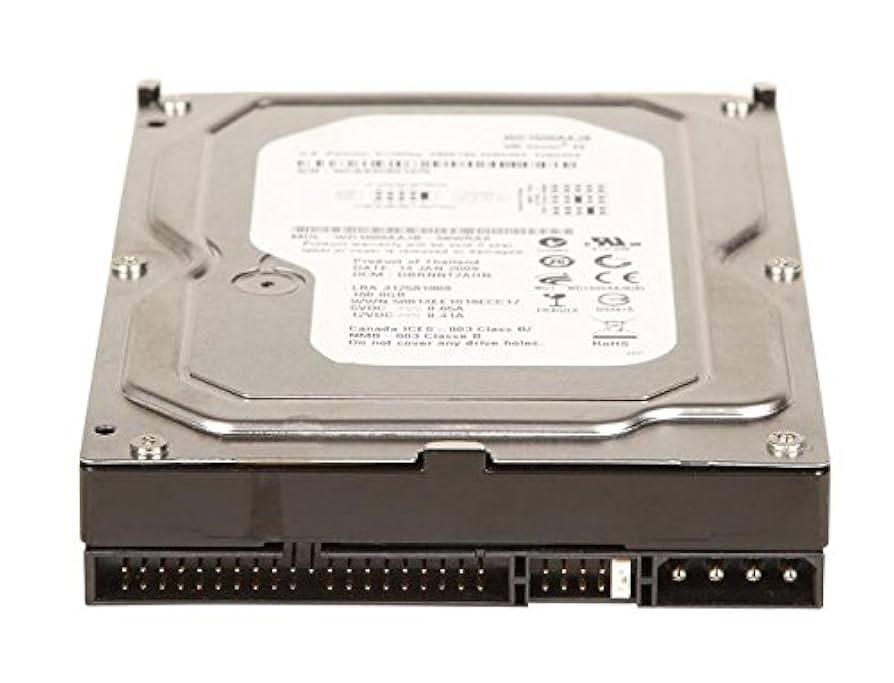
In the rapidly advancing world of data storage technology, IDE (Integrated Drive Electronics) hard drives, also known as PATA drives, hold a nostalgic yet significant place. Once the standard for desktop and laptop computers, these drives are now considered legacy devices. Despite their obsolescence, many organizations and individual users continue to struggle with critical data stored on these older systems.
Seattle Data Recovery has extensive experience in restoring data from IDE hard drives. Whether due to physical failure, accidental deletion, or formatting errors, retrieving data from these legacy devices requires a combination of specialized tools and expert knowledge. This article examines the techniques employed by Seattle Data Recovery to recover and preserve data from IDE hard drives, addressing the specific challenges presented by their age and design.
Understanding IDE Hard Drives: A Brief Overview
IDE hard drives first appeared in the 1980s and gained popularity through the 1990s and early 2000s. These drives connect directly to the motherboard via a 40-pin connector and use a Ribbon cable for data transfer. Unlike modern SATA drives, IDE devices have limitations such as slower data transfer speeds and larger physical sizes, which make them less compatible with current systems.
Despite these limitations, IDE hard drives were renowned for their durability and large capacities during their era. Many vintage computers and industrial systems still operate today, containing valuable data stored on these drives. Recognizing their importance, Seattle Data Recovery offers specialized services to retrieve data from these older devices efficiently and securely.
Diagnosing Issues with Older IDE Devices
Before initiating any recovery process, it is essential to diagnose the specific issues affecting an IDE hard drive. Common problems include physical damage, logical corruption, or compatibility issues with current hardware and software. Physical damage, such as failed read/write heads or motor issues, often necessitates hardware-level interventions.
Logical issues, such as file system corruption or accidental deletion, can typically be addressed through software solutions. Thorough diagnosis ensures that the appropriate recovery methods are employed, minimizing the risk of further data loss. Companies like Seattle Data Recovery excel at accurately identifying these problems, setting the stage for a successful recovery.
Practical Methods for Data Recovery from IDE Hard Drives
Data recovery from IDE drives utilizes a range of techniques, each tailored to address specific issues. Often, a combination of software and hardware solutions provides the best results. Preparing for a recovery begins with assessing the drive's condition and selecting the appropriate method.
For logical data loss, software tools can analyze the drive's file system structure and recover deleted or inaccessible files. Conversely, physical damage requires specialized hardware interventions, which experts in cleanroom environments are best equipped to handle. The next sections detail these approaches and their applications.
Software Solutions: Rebuilding Data with Cutting-Edge Tools
Many data recovery cases, especially those involving accidental deletions, formatting errors, or logical corruption, can be resolved through sophisticated recovery software. These programs scan the IDE hard drive for traces of lost files and attempt to reconstruct them.
Seattle Data Recovery utilizes industry-leading software tools that analyze the drive's file system at multiple levels, including FAT, NTFS, and other formats. These tools can often recover data without the need for physical repairs, provided the drive's hardware is intact and functioning properly. The use of bootable USB drives enables recovery even when the drive is the system's boot drive, preventing further data overwrites.
Hardware-Based Recovery: When Physical Damage is Present
Physical damage to IDE drives is a common barrier to data retrieval, particularly in older devices that are prone to wear and tear. In such situations, data recovery often requires hardware interventions, which are typically performed in specialized cleanroom facilities.
Hardware recovery involves techniques such as replacing damaged read/write heads, repairing circuit boards, or rebuilding motor mechanisms. Skilled technicians at Seattle Data Recovery use advanced tools and protocols to bypass damaged components, extract usable data, and restore access to valuable information.
Connecting Legacy IDE Drives to Modern Systems
One of the practical challenges in recovering data from IDE drives is interfacing them with current hardware. Fortunately, IDE-to-USB adapters are readily available, enabling connectivity between legacy drives and contemporary computers. These adapters often come with power supply options suitable for desktop drives, making data transfer straightforward and efficient.
Seattle Data Recovery employs these adapters in controlled environments to facilitate safe data transfer. This approach minimizes physical handling risks, allowing technicians to perform secure and efficient recovery operations without the need for specialized legacy hardware.
Forensic Data Recovery: Handling Sensitive or Critical Data
In some cases, retrieving data involves legal, security, or investigative considerations. Such scenarios require forensic-grade recovery methods, emphasizing data integrity and thorough documentation to ensure accuracy and reliability. Forensic recovery often involves creating a bit-by-bit copy of the drive, performing analysis, and recovering deleted or hidden files.
When working with old IDE drives, particularly in sensitive cases, Seattle Data Recovery uses state-of-the-art forensic procedures to ensure data authenticity and compliance. Proper handling safeguards the integrity of the recovered data, whether for use as legal evidence, in corporate investigations, or for security audits.
Troubleshooting and BIOS Checks: Ensuring Proper Drive Detection
Before attempting recovery, verifying that the BIOS recognizes the IDE drive is an essential first step. Incorrect BIOS settings or outdated firmware can prevent the drive from being detected, hampering recovery efforts.
Techniques such as configuring IDE channel settings, checking jumper configurations, and updating the motherboard BIOS can resolve detection issues. Additionally, testing the drive on different systems or with alternate cables can help diagnose problems early, saving valuable time and resources.
Minimize Use and Prevent Further Data Loss
If you suspect that an IDE hard drive is failing, it is crucial to minimize its use immediately. Continued operation can exacerbate physical damage or lead to additional data loss. Powering down the drive and consulting with professional data recovery experts, such as Seattle Data Recovery, is the safest course of action.
Timely intervention enhances the chances of successful recovery. Moreover, adopting best practices such as regular backups and disk health monitoring can prevent future data loss incidents, especially with aging IDE drives.
The Importance of Regular Backups and Long-Term Data Security
While recovery techniques are highly effective, the best prevention remains regular and reliable backups. Maintaining copies of essential data on multiple media, including external drives or cloud services, drastically reduces the risk of unrecoverable loss.
Seattle Data Recovery advocates for proactive data management, emphasizing that even legacy devices, such as IDE hard drives, should be included in comprehensive backup strategies. This approach ensures ongoing data integrity and peace of mind, even when dealing with older hardware.
Trust Seattle Data Recovery for Legacy Drive Restoration
In an era dominated by modern storage solutions, legacy IDE hard drives still hold a treasure trove of important data. Whether you are dealing with an aged desktop drive or a vintage laptop component, Seattle Data Recovery offers expert, comprehensive services to recover and preserve your vital information.
By combining advanced software tools, hardware repair capabilities, and forensic techniques, our team can restore data from even the most challenging IDE drives. If you are facing data loss issues with legacy devices, contact Seattle Data Recovery today — your trusted partner in data retrieval and legacy hardware solutions.
The Enduring Value of Legacy IDE Hard Drives
In the rapidly advancing world of data storage technology, IDE (Integrated Drive Electronics) hard drives, also known as PATA drives, hold a nostalgic yet significant place. Once the standard for desktop and laptop computers, these drives are now considered legacy devices. Despite their obsolescence, many organizations and individual users continue to struggle with critical data stored on these older systems.
Seattle Data Recovery has extensive experience in restoring data from IDE hard drives. Whether due to physical failure, accidental deletion, or formatting errors, retrieving data from these legacy devices requires a combination of specialized tools and expert knowledge. This article examines the techniques employed by Seattle Data Recovery to recover and preserve data from IDE hard drives, addressing the specific challenges presented by their age and design.
Understanding IDE Hard Drives: A Brief Overview
IDE hard drives first appeared in the 1980s and gained popularity through the 1990s and early 2000s. These drives connect directly to the motherboard via a 40-pin connector and use a Ribbon cable for data transfer. Unlike modern SATA drives, IDE devices have limitations such as slower data transfer speeds and larger physical sizes, which make them less compatible with current systems.
Despite these limitations, IDE hard drives were renowned for their durability and large capacities during their era. Many vintage computers and industrial systems still operate today, containing valuable data stored on these drives. Recognizing their importance, Seattle Data Recovery offers specialized services to retrieve data from these older devices efficiently and securely.
Diagnosing Issues with Older IDE Devices
Before initiating any recovery process, it is essential to diagnose the specific issues affecting an IDE hard drive. Common problems include physical damage, logical corruption, or compatibility issues with current hardware and software. Physical damage, such as failed read/write heads or motor issues, often necessitates hardware-level interventions.
Logical issues, such as file system corruption or accidental deletion, can typically be addressed through software solutions. Thorough diagnosis ensures that the appropriate recovery methods are employed, minimizing the risk of further data loss. Companies like Seattle Data Recovery excel at accurately identifying these problems, setting the stage for a successful recovery.
Practical Methods for Data Recovery from IDE Hard Drives
Data recovery from IDE drives utilizes a range of techniques, each tailored to address specific issues. Often, a combination of software and hardware solutions provides the best results. Preparing for a recovery begins with assessing the drive's condition and selecting the appropriate method.
For logical data loss, software tools can analyze the drive's file system structure and recover deleted or inaccessible files. Conversely, physical damage requires specialized hardware interventions, which experts in cleanroom environments are best equipped to handle. The next sections detail these approaches and their applications.
Software Solutions: Rebuilding Data with Cutting-Edge Tools
Many data recovery cases, especially those involving accidental deletions, formatting errors, or logical corruption, can be resolved through sophisticated recovery software. These programs scan the IDE hard drive for traces of lost files and attempt to reconstruct them.
Seattle Data Recovery utilizes industry-leading software tools that analyze the drive's file system at multiple levels, including FAT, NTFS, and other formats. These tools can often recover data without the need for physical repairs, provided the drive's hardware is intact and functioning properly. The use of bootable USB drives enables recovery even when the drive is the system's boot drive, preventing further data overwrites.
Hardware-Based Recovery: When Physical Damage is Present
Physical damage to IDE drives is a common barrier to data retrieval, particularly in older devices that are prone to wear and tear. In such situations, data recovery often requires hardware interventions, which are typically performed in specialized cleanroom facilities.
Hardware recovery involves techniques such as replacing damaged read/write heads, repairing circuit boards, or rebuilding motor mechanisms. Skilled technicians at Seattle Data Recovery use advanced tools and protocols to bypass damaged components, extract usable data, and restore access to valuable information.
Connecting Legacy IDE Drives to Modern Systems
One of the practical challenges in recovering data from IDE drives is interfacing them with current hardware. Fortunately, IDE-to-USB adapters are readily available, enabling connectivity between legacy drives and contemporary computers. These adapters often come with power supply options suitable for desktop drives, making data transfer straightforward and efficient.
Seattle Data Recovery employs these adapters in controlled environments to facilitate safe data transfer. This approach minimizes physical handling risks, allowing technicians to perform secure and efficient recovery operations without the need for specialized legacy hardware.
Forensic Data Recovery: Handling Sensitive or Critical Data
In some cases, retrieving data involves legal, security, or investigative considerations. Such scenarios require forensic-grade recovery methods, emphasizing data integrity and thorough documentation to ensure accuracy and reliability. Forensic recovery often involves creating a bit-by-bit copy of the drive, performing analysis, and recovering deleted or hidden files.
When working with old IDE drives, particularly in sensitive cases, Seattle Data Recovery uses state-of-the-art forensic procedures to ensure data authenticity and compliance. Proper handling safeguards the integrity of the recovered data, whether for use as legal evidence, in corporate investigations, or for security audits.
Troubleshooting and BIOS Checks: Ensuring Proper Drive Detection
Before attempting recovery, verifying that the BIOS recognizes the IDE drive is an essential first step. Incorrect BIOS settings or outdated firmware can prevent the drive from being detected, hampering recovery efforts.
Techniques such as configuring IDE channel settings, checking jumper configurations, and updating the motherboard BIOS can resolve detection issues. Additionally, testing the drive on different systems or with alternate cables can help diagnose problems early, saving valuable time and resources.
Minimize Use and Prevent Further Data Loss
If you suspect that an IDE hard drive is failing, it is crucial to minimize its use immediately. Continued operation can exacerbate physical damage or lead to additional data loss. Powering down the drive and consulting with professional data recovery experts, such as Seattle Data Recovery, is the safest course of action.
Timely intervention enhances the chances of successful recovery. Moreover, adopting best practices such as regular backups and disk health monitoring can prevent future data loss incidents, especially with aging IDE drives.
The Importance of Regular Backups and Long-Term Data Security
While recovery techniques are highly effective, the best prevention remains regular and reliable backups. Maintaining copies of essential data on multiple media, including external drives or cloud services, drastically reduces the risk of unrecoverable loss.
Seattle Data Recovery advocates for proactive data management, emphasizing that even legacy devices, such as IDE hard drives, should be included in comprehensive backup strategies. This approach ensures ongoing data integrity and peace of mind, even when dealing with older hardware.
Trust Seattle Data Recovery for Legacy Drive Restoration
In an era dominated by modern storage solutions, legacy IDE hard drives still hold a treasure trove of important data. Whether you are dealing with an aged desktop drive or a vintage laptop component, Seattle Data Recovery offers expert, comprehensive services to recover and preserve your vital information.
By combining advanced software tools, hardware repair capabilities, and forensic techniques, our team can restore data from even the most challenging IDE drives. If you are facing data loss issues with legacy devices, contact Seattle Data Recovery today — your trusted partner in data retrieval and legacy hardware solutions.








