
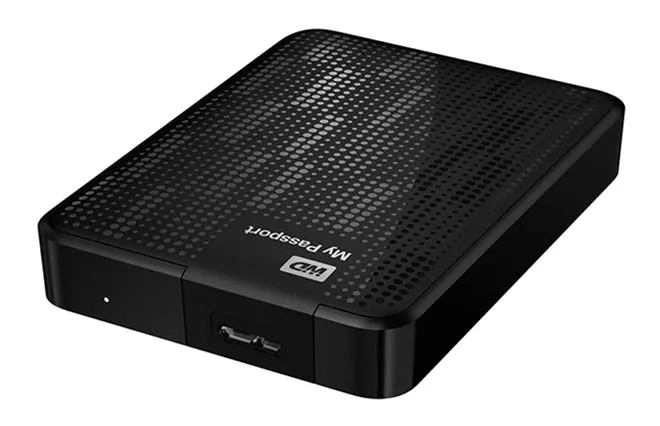
Understanding the Complexity of WD My Passport Data Recovery
When it comes to portable hard drives, Western Digital's WD My Passport series is among the most popular choices due to its sleek design and portability. However, if you're facing data loss with a WD My Passport, it's essential to understand that this particular device presents unique challenges when it comes to data recovery. At Seattle Data Recovery, we've seen firsthand how these drives often require specialized techniques to retrieve your critical data. Recognizing the difficulty in recovering from WD My Passport drives prepares you for the process and underscores the importance of seeking professional help early.
Many users assume that data recovery is a straightforward process, especially with external drives. Sadly, WD My Passport models with soldered USB ports and hardware encryption complicate the process significantly. These design features are intended to enhance security and reduce manufacturing costs; however, they unfortunately make data recovery more complex and time-consuming. If you've experienced data loss with your WD My Passport, don't despair—understanding these challenges is the first step toward recovering your data.
Why WD My Passport Drives Are Among the Most Challenging to Recover
For data recovery, WD My Passport drives stand out due to their combination of integrated electronics, hardware encryption, and potential instability following failure. Unlike traditional external drives, which are easier to troubleshoot due to their modular design, WD My Passport models are built with an all-in-one integration that leaves little room for simple fixes. This integration is precisely what makes recovery difficult—it limits straightforward solutions and demands invasive, highly specialized techniques.
The soldered USB controller and encryption features are designed to enhance security and durability, but they also add layers of complexity. When a WD My Passport drive fails, traditional recovery methods often fall short. The process involves microsoldering, manually decrypting data, and operating in unstable environments—all of which require advanced technical skills and specialized equipment. At Seattle Data Recovery, we understand how stressful this situation can be, which is why we recommend consulting professional services rather than attempting risky DIY repairs.
The Integrated USB Controller: A Major Roadblock
One of the core reasons WD My Passport drives pose such a challenge to data recovery is their integrated USB controller. Unlike conventional external drives that contain a standard SATA hard drive connected to a separate bridge board, WD My Passport models have their USB controller soldered directly onto the drive's main circuit board, or PCB.
This design removes the possibility of simply removing the drive from its enclosure and connecting it via a SATA interface. Instead, technicians must perform microsoldering—a delicate and invasive process—to convert the integrated USB connection into a usable SATA interface. Microsoldering requires specialized tools, experience, and patience, making it a costly and time-consuming endeavor. At Seattle Data Recovery, we've invested in the latest equipment to handle these complex conversions with the utmost precision, ensuring the best chance of recovery for our clients.
The need for such invasive procedures highlights the importance of seeking professional assistance. If not performed correctly, microsoldering can cause further damage, jeopardizing your chances of recovery. Therefore, trusting experienced experts in WD My Passport data recovery is essential—the alternative risks permanent data loss or drive destruction.
Hardware Encryption: Your Data's Fort Knox
Another significant obstacle in recovering data from WD My Passport drives involves hardware encryption. Several models in this series incorporate encryption directly into the drive's hardware, managed through the integrated USB controller on the PCB. While this encryption enhances data security—making unauthorized access difficult—it also significantly complicates recovery efforts.
The USB controller handles decryption when the drive operates normally. However, if the controller or PCB fails, the decryption process stops, rendering the data inaccessible. Even more challenging, attempting to bypass or remove encryption without the proper keys will completely lock you out of your data. At Seattle Data Recovery, we understand the intricacies involved in locating and loading encryption keys, which require highly specialized tools and expertise.
This encryption feature exemplifies the dual-edged nature of modern storage devices. While providing increased security, it requires professional intervention when a drive becomes inaccessible. If you suspect data loss due to encryption issues, it's crucial to avoid using generic recovery software or attempting DIY fixes, as these can potentially render data unrecoverable.
The Instability Factor: When Drives Fail, They Often Fail Harder
Beyond the physical hardware and encryption hurdles, WD My Passport drives are also prone to instability after failure. Once these drives develop a fault—whether it's due to bad sectors, controller issues, or firmware glitches—they often become unreliable and difficult to access. Attempts to connect or recover data can cause the drive to freeze or cause your computer to hang, increasing the risk of further data corruption.
This instability renders standard recovery software ineffective, underscoring the need for expert intervention. At Seattle Data Recovery, we routinely encounter drives that are no longer readable using 'plug-and-play' methods. Instead of risking additional damage, our team employs specialized techniques to bypass the unstable USB interface altogether, connecting directly via SATA (or equivalent) to stabilize the drive and protect your data integrity.
Because these drives tend to deteriorate rapidly once compromised, timing is critical. The sooner you reach out for professional help, the better the chances of successful data recovery before more damage occurs. Remember, trying to force the drive to respond often worsens the condition, making recovery impossible.
Why Does This Design Exist? The Cost and Security Benefits
Understanding why WD chose this integrated design can offer clarity. The all-in-one construction, combined with hardware encryption, was primarily designed to reduce manufacturing costs and enhance data security. By soldering the USB controller directly onto the PCB and integrating encryption management, Western Digital minimized the costs associated with external bridge boards and simplified the device's internal structure.
This design trade-off introduces substantial challenges for data recovery professionals. While it may benefit manufacturers and end-users seeking enhanced security, it significantly complicates the process for those trying to recover lost data. That's why professional data recovery services, such as Seattle Data Recovery, continue to invest heavily in the latest tools and techniques to overcome these hurdles.
Users need to understand that this design is not necessarily a flaw, but rather a deliberate choice by the manufacturer for security and cost reasons. Nonetheless, if you experience drive failure, appreciating these design choices can prepare you for the complex recovery process ahead.
Slow Recovery: Why It Can Take Longer Than Expected
When dealing with WD My Passport drives, a common frustration is the slow recovery process. Several factors can contribute to this extended timeline, all of which are rooted in the drive's intricate design. For example, failing hardware—such as bad sectors or controller malfunction—is often accompanied by firmware glitches that delay the recovery process.
Issues with the USB connection, such as faulty cables or damaged ports, can significantly slow data transfer. Internal media degradation, where the magnetic media on the platters begin to deteriorate, further hampers data access, resulting in extended recovery times. Moreover, attempting to use generic or repair software on these drives often exacerbates the issue, leading to further corruption or unresponsive behavior.
Professional data recovery services prioritize cloning the drive rather than risking additional damage by attempting to fix or write to the failing drive directly. This cloning process ensures that your original data remains intact while recovery efforts proceed from a secure copy. Be prepared for a potentially longer wait, especially when dealing with hardware or firmware issues. Patience and expert handling are the cornerstones of successful recovery from WD My Passport drives.
Best Practices for Protecting and Recovering Your Data
Given the inherent complexities of WD My Passport data recovery, prevention is always better than a cure. To protect your valuable data, always keep backups in multiple locations—whether that's cloud storage, an additional external drive, or a secure offline backup. Regularly updating your backup files ensures that you always have access to your most recent data in the event of a drive failure.
If your WD My Passport drive begins to show signs of problems—such as clicking sounds, slow access times, or error messages—avoid attempting to fix it yourself. Instead, contact a professional data recovery service, such as Seattle Data Recovery, promptly. Early intervention can make a significant difference in recovery success rates, especially before the drive deteriorates further or becomes permanently inaccessible.
Finally, when choosing a recovery service, ensure that they have experience with integrated USB and encrypted drives. Skilled technicians with advanced equipment can perform precise microsoldering and encryption key retrieval, which are essential for successful WD My Passport data recovery. Always prioritize safety and expertise over quick fixes to maximize your chances of regaining your lost data.
Partnering with Seattle Data Recovery for Your WD My Passport Needs
WD My Passport drives, despite their popularity, pose significant challenges for data recovery due to their integrated USB controllers, hardware encryption, and potential instability after failure. Understanding these factors can help you set realistic expectations and recognize the importance of expert assistance. At Seattle Data Recovery, we have extensive experience navigating the complexities of these drives and employ advanced techniques to maximize the success of data recovery.
If you find yourself stranded with a failed WD My Passport, don't hesitate to reach out. Attempting DIY solutions or relying on basic recovery software can often exacerbate the issue, reducing your chances of success. Instead, trust the professionals who understand the intricate architecture of these devices and who can handle microsoldering, encryption, and hardware issues with precision. Your valuable data is worth the effort and expertise we provide.
Remember, when it comes to WD My Passport data loss, early professional intervention is your best chance at salvaging your data. Contact Seattle Data Recovery today and let us put our expertise to work for you.
Understanding the Complexity of WD My Passport Data Recovery
When it comes to portable hard drives, Western Digital's WD My Passport series is among the most popular choices due to its sleek design and portability. However, if you're facing data loss with a WD My Passport, it's essential to understand that this particular device presents unique challenges when it comes to data recovery. At Seattle Data Recovery, we've seen firsthand how these drives often require specialized techniques to retrieve your critical data. Recognizing the difficulty in recovering from WD My Passport drives prepares you for the process and underscores the importance of seeking professional help early.
Many users assume that data recovery is a straightforward process, especially with external drives. Sadly, WD My Passport models with soldered USB ports and hardware encryption complicate the process significantly. These design features are intended to enhance security and reduce manufacturing costs; however, they unfortunately make data recovery more complex and time-consuming. If you've experienced data loss with your WD My Passport, don't despair—understanding these challenges is the first step toward recovering your data.
Why WD My Passport Drives Are Among the Most Challenging to Recover
For data recovery, WD My Passport drives stand out due to their combination of integrated electronics, hardware encryption, and potential instability following failure. Unlike traditional external drives, which are easier to troubleshoot due to their modular design, WD My Passport models are built with an all-in-one integration that leaves little room for simple fixes. This integration is precisely what makes recovery difficult—it limits straightforward solutions and demands invasive, highly specialized techniques.
The soldered USB controller and encryption features are designed to enhance security and durability, but they also add layers of complexity. When a WD My Passport drive fails, traditional recovery methods often fall short. The process involves microsoldering, manually decrypting data, and operating in unstable environments—all of which require advanced technical skills and specialized equipment. At Seattle Data Recovery, we understand how stressful this situation can be, which is why we recommend consulting professional services rather than attempting risky DIY repairs.
The Integrated USB Controller: A Major Roadblock
One of the core reasons WD My Passport drives pose such a challenge to data recovery is their integrated USB controller. Unlike conventional external drives that contain a standard SATA hard drive connected to a separate bridge board, WD My Passport models have their USB controller soldered directly onto the drive's main circuit board, or PCB.
This design removes the possibility of simply removing the drive from its enclosure and connecting it via a SATA interface. Instead, technicians must perform microsoldering—a delicate and invasive process—to convert the integrated USB connection into a usable SATA interface. Microsoldering requires specialized tools, experience, and patience, making it a costly and time-consuming endeavor. At Seattle Data Recovery, we've invested in the latest equipment to handle these complex conversions with the utmost precision, ensuring the best chance of recovery for our clients.
The need for such invasive procedures highlights the importance of seeking professional assistance. If not performed correctly, microsoldering can cause further damage, jeopardizing your chances of recovery. Therefore, trusting experienced experts in WD My Passport data recovery is essential—the alternative risks permanent data loss or drive destruction.
Hardware Encryption: Your Data's Fort Knox
Another significant obstacle in recovering data from WD My Passport drives involves hardware encryption. Several models in this series incorporate encryption directly into the drive's hardware, managed through the integrated USB controller on the PCB. While this encryption enhances data security—making unauthorized access difficult—it also significantly complicates recovery efforts.
The USB controller handles decryption when the drive operates normally. However, if the controller or PCB fails, the decryption process stops, rendering the data inaccessible. Even more challenging, attempting to bypass or remove encryption without the proper keys will completely lock you out of your data. At Seattle Data Recovery, we understand the intricacies involved in locating and loading encryption keys, which require highly specialized tools and expertise.
This encryption feature exemplifies the dual-edged nature of modern storage devices. While providing increased security, it requires professional intervention when a drive becomes inaccessible. If you suspect data loss due to encryption issues, it's crucial to avoid using generic recovery software or attempting DIY fixes, as these can potentially render data unrecoverable.
The Instability Factor: When Drives Fail, They Often Fail Harder
Beyond the physical hardware and encryption hurdles, WD My Passport drives are also prone to instability after failure. Once these drives develop a fault—whether it's due to bad sectors, controller issues, or firmware glitches—they often become unreliable and difficult to access. Attempts to connect or recover data can cause the drive to freeze or cause your computer to hang, increasing the risk of further data corruption.
This instability renders standard recovery software ineffective, underscoring the need for expert intervention. At Seattle Data Recovery, we routinely encounter drives that are no longer readable using 'plug-and-play' methods. Instead of risking additional damage, our team employs specialized techniques to bypass the unstable USB interface altogether, connecting directly via SATA (or equivalent) to stabilize the drive and protect your data integrity.
Because these drives tend to deteriorate rapidly once compromised, timing is critical. The sooner you reach out for professional help, the better the chances of successful data recovery before more damage occurs. Remember, trying to force the drive to respond often worsens the condition, making recovery impossible.
Why Does This Design Exist? The Cost and Security Benefits
Understanding why WD chose this integrated design can offer clarity. The all-in-one construction, combined with hardware encryption, was primarily designed to reduce manufacturing costs and enhance data security. By soldering the USB controller directly onto the PCB and integrating encryption management, Western Digital minimized the costs associated with external bridge boards and simplified the device's internal structure.
This design trade-off introduces substantial challenges for data recovery professionals. While it may benefit manufacturers and end-users seeking enhanced security, it significantly complicates the process for those trying to recover lost data. That's why professional data recovery services, such as Seattle Data Recovery, continue to invest heavily in the latest tools and techniques to overcome these hurdles.
Users need to understand that this design is not necessarily a flaw, but rather a deliberate choice by the manufacturer for security and cost reasons. Nonetheless, if you experience drive failure, appreciating these design choices can prepare you for the complex recovery process ahead.
Slow Recovery: Why It Can Take Longer Than Expected
When dealing with WD My Passport drives, a common frustration is the slow recovery process. Several factors can contribute to this extended timeline, all of which are rooted in the drive's intricate design. For example, failing hardware—such as bad sectors or controller malfunction—is often accompanied by firmware glitches that delay the recovery process.
Issues with the USB connection, such as faulty cables or damaged ports, can significantly slow data transfer. Internal media degradation, where the magnetic media on the platters begin to deteriorate, further hampers data access, resulting in extended recovery times. Moreover, attempting to use generic or repair software on these drives often exacerbates the issue, leading to further corruption or unresponsive behavior.
Professional data recovery services prioritize cloning the drive rather than risking additional damage by attempting to fix or write to the failing drive directly. This cloning process ensures that your original data remains intact while recovery efforts proceed from a secure copy. Be prepared for a potentially longer wait, especially when dealing with hardware or firmware issues. Patience and expert handling are the cornerstones of successful recovery from WD My Passport drives.
Best Practices for Protecting and Recovering Your Data
Given the inherent complexities of WD My Passport data recovery, prevention is always better than a cure. To protect your valuable data, always keep backups in multiple locations—whether that's cloud storage, an additional external drive, or a secure offline backup. Regularly updating your backup files ensures that you always have access to your most recent data in the event of a drive failure.
If your WD My Passport drive begins to show signs of problems—such as clicking sounds, slow access times, or error messages—avoid attempting to fix it yourself. Instead, contact a professional data recovery service, such as Seattle Data Recovery, promptly. Early intervention can make a significant difference in recovery success rates, especially before the drive deteriorates further or becomes permanently inaccessible.
Finally, when choosing a recovery service, ensure that they have experience with integrated USB and encrypted drives. Skilled technicians with advanced equipment can perform precise microsoldering and encryption key retrieval, which are essential for successful WD My Passport data recovery. Always prioritize safety and expertise over quick fixes to maximize your chances of regaining your lost data.
Partnering with Seattle Data Recovery for Your WD My Passport Needs
WD My Passport drives, despite their popularity, pose significant challenges for data recovery due to their integrated USB controllers, hardware encryption, and potential instability after failure. Understanding these factors can help you set realistic expectations and recognize the importance of expert assistance. At Seattle Data Recovery, we have extensive experience navigating the complexities of these drives and employ advanced techniques to maximize the success of data recovery.
If you find yourself stranded with a failed WD My Passport, don't hesitate to reach out. Attempting DIY solutions or relying on basic recovery software can often exacerbate the issue, reducing your chances of success. Instead, trust the professionals who understand the intricate architecture of these devices and who can handle microsoldering, encryption, and hardware issues with precision. Your valuable data is worth the effort and expertise we provide.
Remember, when it comes to WD My Passport data loss, early professional intervention is your best chance at salvaging your data. Contact Seattle Data Recovery today and let us put our expertise to work for you.








